
Module 3: Hands-On with hyggec#
This module outlines the implementation of the hyggec compiler, in its minimal
version that implements the
Hygge0 programming language specification.
We explore how hyggec works, and how it translates a Hygge0 program into
corresponding RISC-V code. We see how to extend both the Hygge0
language and the hyggec compiler with new features. We conclude this module
with some Project Ideas.
Important
This module introduces quite a lot of information that you will use throughout the rest of the course, while working on your project.
Here is a recommendation:
first, focus on grasping the overall picture of how
hyggecworks, without trying to memorise every detail;then, use this module as a reference: come back here when you will need to investigate some aspect of the
hyggeccompiler in more detail. While working on the project, you will also become more familiar with thehyggecinternals.
Quick Start#
Go to the
hyggecGit repository: https://gitlab.gbar.dtu.dk/02247/f26/hyggec (NOTE: you will need to log in with your DTU account)Create your own private fork of the repository, by clicking on the “Fork” button (to the right of the
hyggectitle and logo)Important
To avoid possible plagiarism issues, make sure your forked repository is private, and only accessible by you and the other members of your project group. You can configure the access permissions on the forked repository page, on the menu to the left, by clicking “Manage” → “Members”.
Clone your forked repository on your computer (use the “Code” button to the right. You may choose between cloning via “SSH” or “HTTPS”, and the first is probably better; you may need to configure your SSH keys for authenticating)
Follow the instructions in the file
README.mdin thehyggecrepository.
Important
The
hyggecGit repository linked above will be updated during the course with the new features presented in each Module. Each feature update will have a separate Git tag to distinguish it. The instructions in this Module refer to thehyggeccode up to the taghygge0.If you want, you can find all the
hyggeccompiler updates (covering the whole course) in the “full” Git repository: https://gitlab.gbar.dtu.dk/02247/f26/hyggec-full. Both thehyggecandhyggec-fullrepositories will have the same Git history and tags: the teacher will progressively push the changes fromhyggec-fullinto thehyggecrepository. You may decide to work on your project by directly cloning (or pulling changes from) thehyggec-fullrepository: this may help minimising merge conflicts with your project work during the course. The drawback is that thehyggec-fullrepository contains code that will be explained later in the course, and may be initially unclear.
The Compiler Phases of hyggec#
In the beginning of the course, we discussed what is a compiler and what are the typical phases that allow a compiler to translate an input program into an output program (Fig. 2).
The hyggec compiler has the phases illustrated in
Fig. 2. In this section we explore how each phase
is implemented. A more detailed picture is presented in
Fig. 3, where:
each compiler phase is annotated with the file that handles it in
hyggec;each intermediate compilation product is annotated with the data type that
hyggecuses to represent it;unlike Fig. 2,
hyggecalso includes an interpreter that is not part of the basic compilation pipeline. The interpreter provides a reference for the language semantics and can be integrated in the compilation process to implement optimisations (as we will see later in the course).
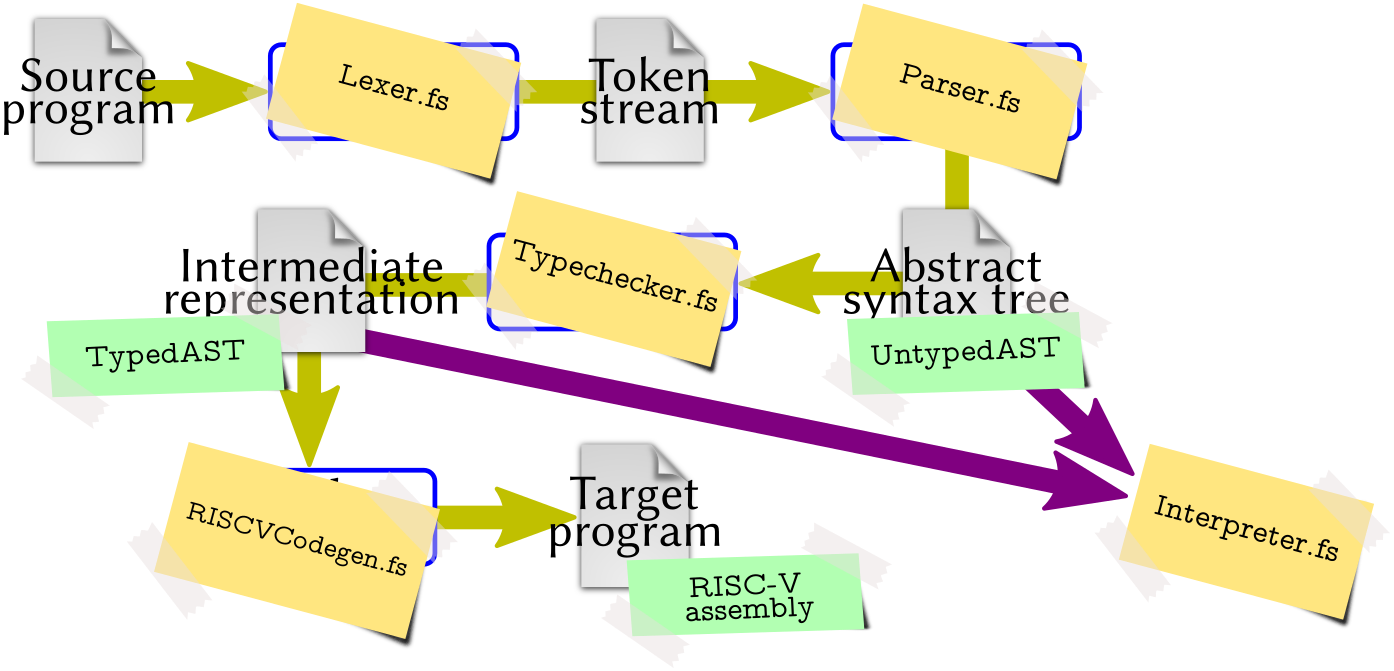
Fig. 3 Phases and main components of the hyggec compiler. (Diagram based on
Fig. 2.)#
Overview of the hyggec Source Tree#
Here is a quick summary of the hyggec source code structure: the files and
directories are roughly ordered depending on how soon (and how often) you will
use or modify them.
Tip
When exploring the hyggec source code with Visual Studio Code (or similar
IDEs), try to hover with the mouse pointer on types, function names, operators,
and variables: in most cases, you will see a brief description of their purpose
(and you can jump to their definition, if you want).
File or directory name |
Description |
|---|---|
|
Scripts to run |
|
Directory containing the |
|
Directory containing the |
|
Representation of the Abstract Syntax Tree (AST) of Hygge0, based on the Definition 1. This file is discussed below in The Abstract Syntax Tree. |
|
Utility functions for manipulating an AST (e.g. apply substitutions). |
|
Lexer that reads Hygge0 source code files and builds a corresponding sequence of tokens. This file is discussed below in The hyggec Lexer |
|
Parser (plus auxiliary functions) that processes a sequence of tokens and builds the corresponding Hygge0 AST. These files are discussed below in The hyggec Parser. |
|
Interpreter for Hygge programs, based on the Structural Operational Semantics of Hygge0. This file is discussed below in The Built-In Interpreter. |
|
Definition of Hygge0 types (based on Definition 5). This file is discussed below in Types and Type Checking. |
|
Functions for performing type checking on a given Hygge0 program AST, according to Definition 8 and Definition 11 (thus including Subtyping). This file is discussed below in Types and Type Checking. |
|
Functions for generating RISC-V assembly code from a well-typed Hygge0 program AST. This file is discussed below in Code Generation Strategy. |
|
Functions for creating and manipulating RISC-V assembly code fragments. This file is discussed below in RISC-V Code Generation Utilities. |
|
Functions to pretty-print various compiler data structures (e.g. ASTs or typing environments) |
|
Utility functions for logging messages on the console. |
|
Miscellaneous utility functions (e.g. for generating unique strings or numbers). |
|
Configuration of the |
|
The main program, with the |
|
This directory contains a few examples of Hygge0 programs. |
|
Test suite configuration and execution functions. The test suite uses the Expecto testing library. |
|
.NET project file. |
|
Utility functions to launch RARS — RISC-V Assembler and Runtime Simulator and immediately execute the compiled RISC-V assembly code. |
|
This directory contains a copy of RARS — RISC-V Assembler and Runtime Simulator, used in |
|
Scripts to launch RARS on Unix-based and Windows operating systems. These
scripts use the copy of RARS contained in the |
|
Should be self-explanatory… |
|
Configuration file for FSharpLint (you can ignore it). |
|
Auto-generated directories, overwritten when the |
The Abstract Syntax Tree#
After the specification of a programming language is completed, one of the first steps towards developing a compiler is (typically) defining the data structures needed for the internal representation of a syntactically-correct program, after it has been read from an input file. This internal representation is called Abstract Syntax Tree (AST) (where the term “abstract” differentiates it from the concrete syntax tree handled by the The hyggec Lexer and Parser, that we discuss later). The AST definition follows the grammar of the language being compiled, with possible adjustments for simplifying the overall compiler implementation.
In the case of hyggec, the AST is defined in the file src/AST.fs and is
based on the Hygge0 grammar in Definition 1. However, the AST
definition includes some adjustments, that we now illustrate.
Defining the AST: First Attempt#
In a programming language like F#, we can very naturally specify an AST using discriminated unions. For instance, we can:
define a type
Exprfor representing a generic Hygge0 expression \(e\), with a dedicated named case to represent each different kind of expression in Definition 1; andin each named case, use fields of type
Exprfor representing sub-expressions.
For example, starting from the bottom of Definition 1, we may
define our AST type Expr as:
type Expr =
    | UnitVal                  // Unit value
    | BoolVal of value: bool   // Boolean value
    | IntVal of value: int     // Integer value
    // ...
    | Var of name: string      // Variable

    // Addition between left-hand-side and right-hand-side sub-expressions.
    | Add of lhs: Expr
           * rhs: Expr

    // Multiplication between left-hand-side and right-hand-side sub-expressions.
    | Mult of lhs: Expr
            * rhs: Expr

    // ...
Using the type definition above, the Hygge0 expression “\(42 + x\)” would be represented in F# as:
Add( IntVal(42), Var("x") )
This approach is valid, but it has three drawbacks.
The definition of
Exprabove does not include information about the position (line and column number) of each sub-expression in the original input file being compiled. We will need this information to generate helpful error messages during type checking, to help Hygge0 programmers find and fix errors in their programs.During type checking, we take a Hygge0 expression \(e\) and compute its typing derivation by following the syntactic structure of \(e\). Therefore, the typing derivation of \(e\) has pretty much the same shape of the syntax tree of \(e\): see, for instance, the typing derivations in Example 14 and Example 15. The main difference is that, unlike a syntax tree, a typing derivation includes information about:
the type assigned to each sub-expression, and
the typing environment used to assign such a type.
This information will be necessary for code generation, so it is very convenient to save it somewhere, when it is generated during type checking. And given the similarities between an AST and a typing derivation, it would be nice to somehow represent both of them with the same data type, thus avoiding code duplication.
Several Hygge0 expressions have very similar semantics (Definition 4), typing rules (Definition 8), and code generation logic (as we will see later). To reduce the amount of duplicated code, it is convenient represent such expressions with a common case in
Expr– adding a field to distinguish them when necessary. This consideration applies to binary arithmetic expressions (“\(e_1 + e_2\)” and “\(e_1 * e_2\)”), binary boolean operations (“\(\hygOr{e_1}{e_2}\)” and “\(\hygAnd{e_1}{e_2}\)”), and relational operations (“\(e_1 = e_2\)” and “\(e_1 < e_2\)”).
The hyggec AST Definition#
We address the drawbacks discussed above in the final definition of the Hygge0
AST, which is available in the file src/AST.fs. The key idea is that we
“wrap” each Expr object with a record of type Node (representing a node of
the AST) which includes:
the position of the expression in the original source file, and
information about the typing of the expression. This information is absent before type-checking, and becomes available after type-checking.
Moreover, in the discriminated union type Expr we define some cases that
capture multiple Hygge0 expressions:
BinNumOpfor binary numerical operations, distinguished by a fieldopof typeNumericalOp;BinLogicOpfor binary logical operations, distinguished by a fieldopof typeLogicOp;BinRelOpfor binary relational operation, distinguished by a fieldopof typeRelationalOp.
As a result, we obtain a unified data type that includes the position of each expression, and can represent ASTs both before and after they are type-checked, while avoiding code duplication for similar expressions. This approach is adopted by many compilers (although the details may vary depending on the implementation programming language); the design here is inspired by the Scala 3 compiler.
The final definition of AST Nodes and Expressions in hyggec is the
following.
type Node<'E,'T> =
    {
      Expr: Expr<'E,'T> // Hygge expression contained in this AST node
      Pos: Position     // Position of the expression in the input source file
      Env: 'E           // Typing environment used to type-check the expression
      Type: 'T          // Type assigned to the expression
    }

and Expr<'E,'T> =
    | UnitVal                  // Unit value
    | BoolVal of value: bool   // Boolean value
    | IntVal of value: int     // Integer value
    // ...
    | Var of name: string      // Variable

    /// Binary numerical operation between lhs and rhs.
    | BinNumOp of op: NumericalOp     // 'op' can be either 'Add' or 'Mult'
                * lhs: Node<'E,'T>
                * rhs: Node<'E,'T>

    /// Binary logical operation between lhs and rhs.
    | BinLogicOp of op: LogicOp       // 'op' can be either 'And' or 'Or'
                  * lhs: Node<'E,'T>
                  * rhs: Node<'E,'T>

    /// Logical not.
    | Not of arg: Node<'E,'T>

    /// Binary relational operation between lhs and rhs.
    | BinRelOp of op: RelationalOp    // 'op' can be either 'Eq' or 'Less'
                * lhs: Node<'E,'T>
                * rhs: Node<'E,'T>

    // ...
The two type arguments of Node<'E,'T> and Expr<'E,'T> are used as follows:
'Especifies what typing environment information is associated to each expression in the AST;'Tspecifies what type information is assigned to each expression in the AST.
The hyggec compiler handles two kinds of ASTs, both based on the definition of
Node<'E,'T> above:
UntypedAST, which contains expressions of typeUntypedExpr(both defined insrc/AST.fs).UntypedASTandUntypedExprare just type aliases, respectively, forNode<unit, unit>andExpr<unit, unit>: they represent AST nodes and expressions without any information (unit) about their typing environments or types (see Example 18 below). This kind of AST represents a syntactically-valid Hygge0 expression read from an input file; it is produced by The hyggec Lexer and Parser, and it may contain expressions that get stuck, like the ones discussed in Example 13.TypedAST, which contains expressions of typeTypedExpr(both defined insrc/Typechecker.fs).TypedASTandTypedExprare just type aliases, respectively, forNode<TypingEnv, Type>andExpr<TypingEnv, Type>: they represent AST nodes and expressions that have been type-checked, and have typing information available (similarly to a typing derivation). We discussTypedASTs in Types and Type Checking.
Example 18 (Untyped AST of a Hygge0 Expression)
Consider the Hygge0 expression “\(42 + x\)”. Its representation in F# as an instance
of type UntypedAST (i.e. Node<unit, unit>) is the following:
{
    Pos  = ... // Position in the input source file
    Env  = ()
    Type = ()
    Expr = BinNumOp(
                    Add,           // Type of binary numerical operation
                    {
                        Pos  = ... // Position in the input source file
                        Env  = ()
                        Type = ()
                        Expr = IntVal(42)
                    },
                    {
                        Pos  = ... // Position in the input source file
                        Env  = ()
                        Type = ()
                        Expr = Var("x")
                    } )
}
The file src/AST.fs also defines two types called PretypeNode and Pretype
that represent, respectively, the syntax tree node of a pretype, and the pretype
itself from Definition 1.
type PretypeNode =
    {
      Pos: Position    // Position of the pretype in the source file
      Pretype: Pretype // Pretype contained in this Abstract Syntax Tree node
    }

and Pretype =
    | TId of id: string  // A type identifier
Note
This representation of pretypes with two data types may seem a bit redundant —
but it will allow us to easily extend the Pretype definition (and the types
supported by hyggec) later in the course.
The hyggec Lexer and Parser#
After we establish the internal representation of the AST, a logical next step in constructing a compiler is to develop the functions that builds such ASTs by reading some input text (i.e. the source code we wish to compile). To this purpose, we need to develop two components.
A lexer (a.k.a. tokenizer or scanner) that reads the input text and classifies groups of characters that are either “useful” for building a syntax tree (e.g. identifiers, operators, parentheses…) or “useless” (e.g. sequences of white spaces, newlines, comments…). These groups of characters are typically recognised by matching them against a set of regular expressions; the goal of the lexer is to discard useless groups of characters, and turn the useful groups into tokens (or lexemes): each token captures a group of character and assigns to it a lexical category. The lexer should also report a tokenization error if it sees a sequence of input characters that it cannot classify.
A parser that reads a stream of tokens produced by a lexer, and tries to match them against a set of grammar rules, thus producing a corresponding syntax tree. The parser should produce a syntax error if it is unable to match the input tokens with any of the grammar rules.
In the following subsections we explore the implementation of The hyggec Lexer and The hyggec Parser.
The hyggec Lexer#
The file src/Lexer.fs implements a function tokenize that reads the contents
of an input file (which should contain Hygge0 source code) and produces a
sequence of tokens.
The beginning of src/Lexer.fs defines a discriminated union type called
Token whose cases represent all the tokens of the Hygge0 programming language.
/// A token, possibly carrying a value.
type Token =
    /// Left parenthesis.
    | LPAREN
    /// Right parenthesis.
    | RPAREN
    /// Left curly bracket.
    | LCURLY
    /// Right curly bracket.
    | LCURLY

    // ...

    /// Integer literal.
    | LIT_INT of value: int
    /// Floating-point literal.
    | LIT_FLOAT of value: single
    /// Boolean literal.
    | LIT_BOOL of value: bool
    /// String literal.
    | LIT_STRING of value: string
    /// Unit literal.
    | LIT_UNIT
    /// Generic identifier (might result in a variable, pretype, etc.).
    | IDENT of value: string
    /// End of file.
    | EOF
Then, src/Lexer.fs defines two data types:
Positionto represent a position in an input file – mainly, line and column numbers; andTokenWithPos, a record that combines aTokenwith twoPositions – one marking the beginning and one marking the end of the token in the input file.
The core of the tokenization logic is the function tokenizeRec (called by
tokenize), which recursively traverses an input string, applies a series of
rules to pattern-match its characters and produce corresponding tokens, and
accumulates such tokens into a collection acc. The function returns Ok if it
tokenizes the whole string, or Error (with a message) if it encounters input
characters that cannot be matched by any rule. The function tokenizeRec looks
as follows:
 1/// Recursively tokenize the given 'input' string, using 'pos' as the current
 2/// position, and accumulating the accepted tokens with positions in 'acc'.
 3/// Return either Ok (), or Error with an error message.
 4let rec tokenizeRec (input: string) (pos: Position)
 5                    (acc: ResizeArray<TokenWithPos>): Result<unit,string> =
 6    match input[pos.Offset..] with
 7    | "" -> // We reached the end of the input string: add EOF and return Ok
 8        acc.Add { Token = EOF; Begin = pos; End = pos }
 9        Ok ()
10
11    | Whitespace pos pos'
12    | Comment    pos pos'
13    | Newline    pos pos' ->
14        // Just keep tokenizing the rest of the input at position pos'
15        tokenizeRec input pos' acc
16
17    // IMPORTANT: longer symbols must be matched first, otherwise they may be
18    // tokenized as multiple shorter symbols. E.g., if the rule for token
19    // LIT_UNIT is moved after LPAREN and RPAREN, then LPAREN and RPAREN will be
20    // matched first and LIT_UNIT will never be produced.
21    | Symbol "()" LIT_UNIT pos (accepted, pos')
22    | Symbol "("  LPAREN   pos (accepted, pos')
23    | Symbol ")"  RPAREN   pos (accepted, pos')
24    | Symbol "{"  LCURLY   pos (accepted, pos')
25    | Symbol "}"  RCURLY   pos (accepted, pos')
26    | Symbol "+"  PLUS     pos (accepted, pos')
27    | Symbol "*"  TIMES    pos (accepted, pos')
28    | Symbol "="  EQ       pos (accepted, pos')
29    | Symbol "<"  LT       pos (accepted, pos')
30    | Symbol ";"  SEMI     pos (accepted, pos')
31    | Symbol ":"  COLON    pos (accepted, pos')
32    | Regex @"(\d+\.?\d*|\.\d+)([eE][+-]?\d+)?f" mkFloatLit       pos (accepted, pos')
33    | Regex @"\d+"                               mkIntegerLit     pos (accepted, pos')
34    | Regex "\"(\\\\\"|[^\"])*\""                mkStringLit      pos (accepted, pos')
35    | Regex @"[a-zA-Z_][a-zA-Z0-9_]*"            mkKeywordOrIdent pos (accepted, pos') ->
36        // Add the accepted token to acc and keep tokenizing the rest of the
37        // input at position pos'
38        acc.Add accepted
39        tokenizeRec input pos' acc
40
41    | other -> // There are more input characters but they do not match any rule
42        /// The first 8 (at most) characters of the remaining input
43        let len = min (other.Length-1) 7
44        Error $"{pos.Filename}:{pos.Line}:{pos.Column}: unrecognized input: {other[..len]}"
For example:
Line 26 says that if the first characters in the
inputstring are equal to the string"+", then the lexer produces a tokenPLUS(a case of the discriminated unionTokendefined above) at the currentposition.Line 33 says that if the first characters in the
inputstring are matched by the .NET regular expression"\d+"(meaning “one or more digits”), then the lexer passes the matched characters to the functionmkIntegerLit(also defined insrc/Lexer.fs) – which in turn produces a tokenLIT_INTcarrying the integer value matched by the regular expression.Line 35 is similar to the previous one, except that it matches input characters using a .NET regular expression that describes a generic identifier (starting with a letter or
_, followed by zero or more letters, digits, or_). Then, it produces a token by passing the matched string to the functionmkKeywordOrIdent, which distinguishes reserved keywords (which are converted into their respective tokens) from identifiers:/// Convert a string into a keyword token or an identifier. and internal mkKeywordOrIdent (s: string) = match s with | "and" -> AND | "or" -> OR | "not" -> NOT | "if" -> IF // ... | "true" -> LIT_BOOL true | "false" -> LIT_BOOL false | other -> IDENT other
In all three cases discussed above, the newly-produced token is assigned to the
variable accepted, while the new tokenization position is assigned to pos'.
Then, on lines 38-39, the function tokenizeRec adds the accepted token to
acc and continues recursively from the new position pos'.
Instead, lines 11–15 say that if the first characters in the input string
are a whitespace, a comment (beginning with //), or a newline, then no token
is produced: such characters are skipped and tokenizeRec continues recursively
from the updated position pos'.
Note
In the tokenizeRec code snippet above, Whitespace, Comment, Newline,
Symbol, and Regex are F# active patterns, i.e., custom high-level
pattern matching constructs that make the tokenization rules more readable and
intuitive, by hiding some low-level details (character-by-character matching,
token positions computation). These active patterns are defined in src/Lexer.fs
(after tokenizeRec).
During your project you will need to use those predefined active patterns – but it is unlikely that you will need to modify them, or write new ones.
Example 19 (Tokenizing a Hygge0 Expression)
Create a file called test.hyg, with the following content:
42 + x // This is a comment!
You can tokenize this file by executing:
./hyggec tokenize test.hyg
After hyggec reads this file, the function tokenizeRec processes its
contents character-by-character, grouping and classifying the characters
according to its pattern-matching rules. Therefore, the lexer matches the
characters in the file as follows:
42, that produces a tokenLIT_INTcarrying the integer value 42;a white space, that is skipped;
+, that produces a tokenPLUS;a white space, that is skipped;
x, that produces a tokenIDENTcarrying the value"x";//, which marks the beginning of a comment: all characters until the end of the line are skipped and no token is produced;the end of the input characters, which produces a token
EOF.
When the tokenization process is complete, the sequence of tokens produced by
tokenizeRec is displayed by hyggec as follows:
LIT_INT 42 (1:1-1:2, offset 0-1)
PLUS (1:4-1:4, offset 3-3)
IDENT "x" (1:6-1:6, offset 5-5)
EOF (2:1-2:1, offset 29-29)
The numbers between parentheses describe the token position. For instance,
LIT_INT 42 spans from line 1, column 1 to line 1, column 2 (included); its
offset in number of characters from the beginning of the file spans from 0 to 1
(included).
Example 20 (Lexing Errors)
To see how the hyggec lexer produces erros, try adding e.g. the
character $ somewhere in the file test.hyg from Example 19
above; then, try running again ./hyggec tokenize test.hyg.
The hyggec Parser#
The file src/Parser.fs defines a function parse that takes a collection of
tokens with positions (produced by the function tokenize in
The hyggec Lexer) and returns either Ok with an instance of UntypedAST
(see The hyggec AST Definition), or Error with a message describing what
went wrong.
The function parse wraps the tokens produced by the lexer into a
TokenStream, which is a data structure (defined in ParserUtils.fs) that keeps
track of the current parsing position and errors. The main methods of a
TokenStream object stream are:
stream.Current(): return theTokenWithPosat the head ofstream;stream.Advance(): advance thestreamto the nextTokenWithPos.
Then, parse passes the TokenStream to the parsing function pProgram, which
in turn recursively calls other parsing functions to process the token stream
and progressively build and return an UntypedAST instance.
The function pProgram and the other parsing functions in src/Parser.fs are
implemented using parser combinators, a popular technique for writing parsers
in functional programming style. If you scroll through src/Parser.fs you will
see various definitions that are intuitively similar to some grammar rules in
Definition 1. For example, consider the following definition of
pLet:
/// Parse a 'let' binding without type annotation.
let pLet =
    pToken LET ->>- pIdent ->>-
        (pToken EQ >>- pSimpleExpr) ->>-
        (pToken SEMI >>- pExpr)
            |>> fun (((tok, (_, name)), init), scope) ->
                mkNode (AST.Expr.Let (name, init, scope)) ...
Observe that:
the part before the symbol
|>>follows the syntactic shape of the expressions “\(\hygLetU{x}{e}{e'}\)” (mentioning tokens fromsrc/Lexer.fs);the part after the symbol
|>>is a function that creates an AST node containing aLetexpression.
The next subsections explain how parsers like pLet above work, the meaning of
symbols like ->>-, >>-, and |>> (which are summarised in
Table 5 below) and how they are used in
src/Parser.fs.
Parser Combinators in a Nutshell explains the basic idea and introduces the parser combinators
->>-,->>,>>-,choice, andchainl1;Overview of the hyggec Parser Implementation presents two more combinators (
>>=andpreturn);Finally, we see The hyggec Parser in Action with some examples.
Important
When working on your project, it is unlikely that you will need to modify the
functions and parser combinators defined in the file src/ParserUtils.fs
(and summarised in Table 5).
Still, a basic understanding of how they work will be necessary for
extending the parsers in src/Parser.fs to support new expressions.
Parser combinator |
Description |
Explained in… |
|---|---|---|
|
Parse |
|
|
Parse |
|
|
Parse |
|
|
Try each parser in the list |
Parser Combinators for Choices and Left-Associative Chaining (choice, chainl1) |
|
Parse one or more instances of |
Parser Combinators for Choices and Left-Associative Chaining (choice, chainl1) |
|
Parse |
|
|
Parse |
|
|
Return the value |
Parser Combinators in a Nutshell#
A parser is a function that takes a TokenStream as argument, “consumes” its
tokens (by calling the method Advance() to move to the next token), and
returns some result or an error. The result of a parsing function is usually
(but not necessarily!) an instance of the data type UntypedAST presented in
The hyggec AST Definition.
In this section we discuss how to write complex parsers by combining and reusing simple parsers. We first explore how to write a parser that accepts simple sequences of tokens using Basic Parser Combinators (->>-, ->>, >>-, |>>); then, we improve that parser using Parser Combinators for Choices and Left-Associative Chaining (choice, chainl1).
Basic Parser Combinators (->>-, ->>, >>-, |>>)#
Consider a TokenStream containing the sequence of tokens produced at the end
of Example 19:
[LIT_INT 42; PLUS; IDENT "x"; EOF]
Suppose that our goal is to write a parser that consumes such tokens and returns the AST for the Hygge0 expression \(42 + x\). To achieve this goal, we can write some simple parsers and then combine them. For example, the tokens in the sequence above may be parsed individually using the following three simple parsers. Observe that each parser advances the token stream if the current token is the expected one – otherwise, the parser returns an error message describing what the parser expected to see.
Note
To create UntypedAST nodes, the code snippets below uses the utility function
mkNode defined in src/ParserUtils.fs. It takes 4 arguments: the
UntypedExpr carried by the new AST node, the main Position of the AST node,
where it begins, and where it ends.
/// Parse an integer value, producing an AST node with an IntVal expression.
let pIntVal (stream: TokenStream): Result<UntypedAST, string> =
    let tok = stream.Current()
    match tok.Token with
        | LIT_INT v ->
            stream.Advance()
            Ok (mkNode (AST.Expr.IntVal v) tok.Begin tok.Begin tok.End)
        | _ -> Error "LIT_INT"

/// Parse a variable, producing an AST node with a Var expression.
let pVariable (stream: TokenStream): Result<UntypedAST, string> =
    let tok = stream.Current()
    match tok.Token with
        | IDENT name ->
            stream.Advance()
            Ok (mkNode (AST.Expr.Var name) tok.Begin tok.Begin tok.End)
        | _ -> Error "IDENT"

/// Parse a token if it has the given 'tokenType'. Return either Ok and the
/// token with position, or Error with a string describing the expected token.
let pToken (tokenType: Token) (stream: TokenStream): Result<TokenWithPos, string> =
    let tok = stream.Current()
    match tok.Token with
    | t when t = tokenType ->
        stream.Advance()
        Ok tok
    | _ ->
        Error (tokenType.ToString())
We can now combine the simple parsers above into a parser called pAddIntToVar
that can consume the first 3 tokens of the stream
[LIT_INT 42; PLUS; IDENT "x"; EOF] to create and return an UntypedAST node
(representing the expression \(42 + x\)), as follows:
let pAddIntToVar (stream: TokenStream): Result<UntypedAST, string> =
    match (pIntVal stream) with
    | Ok lhs ->
        match (pToken PLUS stream) with
        | Ok tok ->
            match (pVariable stream) with
            | Ok rhs ->
                mkNode (AST.Expr.BinNumOp (AST.NumericalOp.Add, lhs, rhs))
                       tok.Begin lhs.Pos.Begin rhs.Pos.End
            | Error msg -> Error msg
        | Error msg -> Error msg
    | Error msg -> Error msg
The code of pAddIntToVar above contains some patterns that are very common
when writing parsing functions:
execute parsers in sequence, returning an error as soon as one fails; and
use the value returned by a successful parser to compute other values (in this case, using
mkNode).
These patterns are captured by the operators ->>- and |>> below,
which are examples of parser combinators (and are defined in
src/ParserUtils.fs):
/// Create a parser that parses both 'p1' and then 'p2', and returns both their
/// results as a tuple. If either 'p1' or 'p2' fails, return the corresponding
/// error.
let (->>-) (p1: TokenStream -> Result<'A, 'E>)
           (p2: TokenStream -> Result<'B, 'E>)
           (stream: TokenStream): Result<'A * 'B, 'E> = ...

/// Create a parser that parses 'p', then applies 'f' to its result. If 'p'
/// fails, return the corresponding error.
let (|>>) (p: TokenStream -> Result<'A, 'E>)
          (f: 'A -> 'B)
          (stream: TokenStream): Result<'B, 'E> = ...
Using these two combinators, we can rewrite the parsing function pAddIntToVar
above as:
1let pAddIntToVar (stream: TokenStream): Result<UntypedAST, string> =
2    ((pIntVal ->>- (pToken PLUS)) ->>- pVariable
3        |>> fun ((lhs, tok), rhs) ->
4            mkNode (AST.Expr.BinNumOp (AST.NumericalOp.Add, lhs, rhs))
5                   tok.Begin lhs.Pos.Begin rhs.Pos.End) stream
Observe that:
on line 2,
(pIntVal ->>- (pToken PLUS)) ->>- pVariableis a parser that attempts to parse an integer, then a tokenPLUS, then a variable. The output of this parser is a nested tuple of the form((lhs, tok), rhs), wherelhsandrhsareUntypedASTnodes (produced bypIntValandpVariable, respectively) andtokis aTokenWithPos(produced bypToken PLUS);on line 3,
... |>> ...constructs a parser that runs the parser above, takes its return value, and passes it to a function (lines 3-5) which creates and returns anUntypedASTnode;finally, on line 5, the parser constructed by
... |>> ...above is applied tostream.
We can further simplify this definition of pAddIntToVar by removing
unnecessary parentheses (because ->>- is left-associative) and leveraging
F#’s partial function application to omit the argument stream:
let pAddIntToVar: TokenStream -> Result<UntypedAST, string> =
    pIntVal ->>- (pToken PLUS) ->>- pVariable
        |>> fun ((lhs, tok), rhs) ->
            mkNode (AST.Expr.BinNumOp (AST.NumericalOp.Add, lhs, rhs))
                   tok.Begin lhs.Pos.Begin rhs.Pos.End
As a final cleanup, we can remove the type annotation (because F# can infer it):
let pAddIntToVar =
    pIntVal ->>- (pToken PLUS) ->>- pVariable
        |>> fun ((lhs, tok), rhs) ->
            mkNode (AST.Expr.BinNumOp (AST.NumericalOp.Add, lhs, rhs))
                   tok.Begin lhs.Pos.Begin rhs.Pos.End
Observe that this definition of pAddIntToVar is quite short and intuitively
describes what it tries to parse (to the left of |>>) and what it returns when
it succeeds (to the right of |>>). Moreover, the code of pAddIntToVar is not
cluttered by error handling (which is performed automatically by the parser
combinators ->>- and |>>).
To complete the parsing of the stream [LIT_INT 42; PLUS; IDENT "x"; EOF], we
can create another parser called pAddIntToVarEOF that first applies
pAddIntToVar above, and then parses the remaining token EOF (using pToken
above):
let pAddIntToVarEOF =
    pAddIntToVar ->>- (pToken EOF)
        |>> fun (node, _tok) ->
            node
Observe that this implementation of pAddIntToVarEOF does not use the token
_tok produced by the parser pToken EOF. This is another common pattern when
writing parsing functions: it may be necessary to parse something (usually a
token, like EOF in this case) and then discard the result. This pattern is
captured by the parser combinators ->> and >>- below (defined in
src/ParserUtils.fs):
/// Create a parser that parses both 'p1' and 'p2', and returns only the result
/// of 'p1'. If either 'p1' or 'p2' fails, return the corresponding error.
let (->>) (p1: TokenStream -> Result<'A, 'E>)
          (p2: TokenStream -> Result<'B, 'E>)
          (stream: TokenStream): Result<'A, 'E> = ...

/// Create a parser that parses both 'p1' and 'p2', and returns only the result
/// of 'p2'. If either 'p1' or 'p2' fails, return the corresponding error.
let (>>-) (p1: TokenStream -> Result<'A, 'E>)
          (p2: TokenStream -> Result<'B, 'E>)
          (stream: TokenStream): Result<'B, 'E> = ...
Using the parser combinator ->> we can simplify pAddIntToVarEOF above as
follows:
let pAddIntToVarEOF =
    pAddIntToVar ->> (pToken EOF)
        |>> fun node ->
            node
Notice that now ... |>> fun node -> node is redundant, because it is just
returning the AST node produced by pAddIntToVar ->> (pToken EOF). Therefore,
we can simplify pAddIntToVarEOF further:
let pAddIntToVarEOF =
    pAddIntToVar ->> (pToken EOF)
Summing up, here is the code of a parser that can parse the stream of tokens
(with positions) [LIT_INT 42; PLUS; IDENT "x"; EOF] and return a
corresponding AST node containing the Hygge0 expression \(42 + x\):
let pIntVal (stream: TokenStream) = ... // See above

let pVariable (stream: TokenStream) = ... // See above

let pToken (tokenType: Token) (stream: TokenStream) = ... // See above

let pAddIntToVar =
    pIntVal ->>- (pToken PLUS) ->>- pVariable
        |>> fun ((lhs, tok), rhs) ->
            mkNode (AST.Expr.BinNumOp (AST.NumericalOp.Add, lhs, rhs))
                   tok.Begin lhs.Pos.Begin rhs.Pos.End

let pAddIntToVarEOF =
    pAddIntToVar ->> (pToken EOF)
By reading these parser definitions bottom-up, we can intuitively see that, if
we call pAddIntToVarEOF stream, the following happens:
pAddIntToVarEOFtries to parsepAddIntToVarand then parseEOF– and if successful, it returns the result of the first parser;pAddIntToVar, in turn, tries to parse an integer, then a tokenPLUS, then a variable – and if successful, creates and returns an AST node with an addition.
Parser Combinators for Choices and Left-Associative Chaining (choice, chainl1)#
The parser pAddIntToVarEOF written at the end of
Basic Parser Combinators (->>-, ->>, >>-, |>>) is very restrictive: it can parse a
stream of tokens that correspond to a Hygge0 expression like “\(42 + x\)” – but
it cannot parse e.g. the expression “\(x + 42\)” although both expressions
should be valid according to Definition 1. To relax the parser,
we can introduce choices by using the following parser combinator (defined in
src/ParserUtils.fs):
/// Create a parser that tries each parser in the list 'parsers' in order until
/// one succeeds. When a parser fails, backtrack the 'stream' before trying the
/// next parser. If all parsers fail, return the error produced by the last
/// parser.
let choice (parsers: list<TokenStream -> Result<'A, string>>)
           (stream: TokenStream): Result<'A, string> = ...
We can then use choice to write a parser pVarOrIntVal that parses either an
integer or a variable; then, we can use pVarOrIntVal to write the parsers
pAdd and pAddEOF below:
let pIntVal (stream: TokenStream) = ... // See above

let pVariable (stream: TokenStream) = ... // See above

let pToken (tokenType: Token) (stream: TokenStream) = ... // See above

let pVarOrIntVal = choice [
    pIntVal
    pVariable
]

let pAdd =
  pVarOrIntVal ->>- (pToken PLUS) ->>- pVarOrIntVal
        |>> fun ((lhs, tok), rhs) ->
            mkNode (AST.Expr.BinNumOp (AST.NumericalOp.Add, lhs, rhs))
                   tok.Begin lhs.Pos.Begin rhs.Pos.End

let pAddEOF =
    pAdd ->> (pToken EOF)
This new parser pAddEOF can parse sequences of tokens corresponding to any
addition between variables and integers, followed by EOF. For example:
[LIT_INT 42; PLUS; IDENT "x"; EOF]– produces the AST for \(42 + x\)[IDENT "x"; PLUS; LIT_INT 42; EOF]– produces the AST for \(x + 42\)[LIT_INT 42; PLUS; LIT_INT 43; EOF]– produces the AST for \(42 + 43\)[IDENT "x"; PLUS; IDENT "y"; EOF]– produces the AST for \(x + y\)…
However, pAddEOF is still quite limited: it cannot parse a stream of tokens
corresponding to a sequence of additions with 3 or more operands. For example,
consider:
[IDENT "x"; PLUS; IDENT "y"; PLUS; IDENT "w"; PLUS; IDENT "z"; EOF]`
This sequence of tokens should be parsed taking into account that \(+\) is
left-associative, hence the resulting AST should correspond to
\(((x + y) + w) + z\). To achieve this, we need to revise pAdd: we need to keep
parsing additions while accumulating the parsing outputs, as follows:
First, try running
pValOrIntValto parse an integer or variable. If successful, theUntypedASTnode returned by this parser will be the initial value for an accumulatoracc;Try parsing a token
PLUSfollowed by anotherpValOrIntVal:If the parsing succeeds, create a new
UntypedASTnode with an addition between the accumulatoraccand the result of the newly-parsedpValOrIntVal. Use this newUntypedASTas the new value for the accumulatoraccand repeat from point 2;Instead, if the parsing fails, return the current accumulator
acc.
This is a very common pattern that is captured by the parser combinator
chainl1 (defined in src/ParserUtils.fs):
/// Create a parser that parses one or more occurrences of 'p' separated by
/// 'op', with left associativity. If the first parsing of 'p' fails, return the
/// corresponding error. Otherwise, the first parsing of 'p' provides the
/// initial value for an accumulator. The result of parsing 'op' is a function
/// that takes the accumulator and the result of the next parsing of 'p', and
/// returns a new accumulator. Iterate by parsing 'op' and then 'p' and
/// accumulating their result; when either 'op' or 'p' fails, backtrack the
/// 'stream' after the last successful 'p' and return the current value of the
/// accumulator.
let inline chainl1 (p: TokenStream -> Result<'A, string>)
                   (op: TokenStream -> Result<('A -> 'A -> 'A), string>)
                   (stream: TokenStream): Result<'A, string> = ...
Using chainl1 we can improve the parser pAdd above as follows:
1let pAdd =
2    chainl1 pVarOrIntVal
3        (pToken PLUS
4            |>> fun tok ->
5                fun acc rhs ->
6                    mkNode (BinNumOp (AST.NumericalOp.Add, acc, rhs))
7                           tok.Begin acc.Pos.Begin rhs.Pos.End)
Now, if stream contains
[IDENT "x"; PLUS; IDENT "y"; PLUS; IDENT "w"; PLUS; IDENT "z"; EOF], then
pAdd stream works as follows:
First,
chainl1tries to parsepVarOrIntVal, which succeeds by producing the AST node for the variable \(x\). This AST node becomes the value of an accumulator: let’s call this accumulatoracc;chainl1tries to parsepToken PLUS |>> fun tok -> ..., which succeeds and returns the function on lines 5–7. Let’s call this functionf;chainl1tries to parsepVarOrIntValagain, which succeeds by producing the AST node for the variable \(y\). Let’s call this AST noderhs;chainl1callsf acc rhs, which returns the AST node for the addition expression \(x + y\). This AST node becomes the new accumulatoracc;chainl1tries to parsepToken PLUS |>> fun tok -> ...again, which succeeds and returns the function on lines 5–7. Let’s call this functionf;chainl1tries to parsepVarOrIntValagain, which succeeds by producing the AST node for the variable \(w\). Let’s call this AST noderhs;chainl1callsf acc rhs, which returns the AST node for the addition expression \((x + y) + w\). This AST node becomes the new accumulatoracc;chainl1tries to parsepToken PLUS |>> fun tok -> ...again, which succeeds and returns the function on lines 5–7. Let’s call this functionf;chainl1tries to parsepVarOrIntValagain, which succeeds by producing the AST node for the variable \(z\). Let’s call this AST noderhs;chainl1callsf acc rhs, which returns the AST node for the addition expression \(((x + y) + w) + z\). This AST node becomes the new accumulatoracc;chainl1tries to parsepToken PLUS |>> fun tok -> ...again, which fails (because it sees the tokenEOFinstead ofPLUS). Therefore,chainl1returns the current value of the accumulatoracc, i.e., the AST node for the expression \(((x + y) + w) + z\).
Overview of the hyggec Parser Implementation#
The file src/Parser.fs implements the Hygge0 grammar in
Definition 1 using the parser combinators outlined
above. As mentioned earlier, the function
parse in src/Parser.fs passes a TokenStream to the parsing function
pProgram – which looks as follows:
/// Parse a whole Hygge program (i.e., an expression followed by EOF); if the
/// parsing fails, report a summary of all errors.
let pProgram: TokenStream -> Result<AST.UntypedAST, Lexer2.Position * string> =
    pExpr ->> pToken EOF  |>  summarizeErrors
I.e., pProgram creates the parser pExpr ->> pToken EOF and uses
summarizeErrors (defined in src/ParserUtils.fs) to collect and report its
parsing errors. The parser pExpr, in turn, parses Hygge0 expressions by
combining and recursively calling other parsers that correspond to the various
Hygge0 grammar rules in Definition 1.
The next subsections illustrate some key features of src/Parser.fs:
Avoiding Grammar Ambiguities and Implementing Operator Precedence#
Importantly, the way the parsers in src/Parser.fs are composed and recursively
call each other is designed to enforce a certain parsing order that avoids
Grammar Ambiguities and provides standard precedence to
arithmetic operators. In the case of additions and multiplications, this is
achieved as follows:
When
pExprrecursively calls other parsers, it always reaches the parserpAddExpr(which produces addition expressions) beforepMultExpr(which produces multiplication expressions);The parser
pAddExpr, in turn, is implemented as follows:/// Parse an additive expression. let pAddExpr = chainl1 pMultExpr (choice [ pToken PLUS |>> fun tok -> fun acc rhs -> mkNode (AST.Expr.BinNumOp (AST.NumericalOp.Add, acc, rhs)) tok.Begin acc.Pos.Begin rhs.Pos.End ])
In other words, the parser
pAddExpruses the combinatorchainl1to parse one or morepMultExprs separated by+. This means that AST nodes with multiplications are created “earlier” than AST nodes with additions: e.g.,[LIT_INT 1; TIMES; LIT_INT 2; PLUS; LIT_INT 3; TIMES; LIT_INT 4]is parsed as \((1 * 2) + (3 * 4)\).The parser
pMultExpr, in turn, has a similar shape and is implemented as follows:/// Parse a multiplicative expression. let pMultExpr = chainl1 pUnaryExpr (choice [ pToken TIMES |>> fun tok -> fun acc rhs -> mkNode (AST.Expr.BinNumOp (AST.NumericalOp.Mult, acc, rhs)) tok.Begin acc.Pos.Begin rhs.Pos.End ])
In other words, the parser
pMultExpruses the combinatorchainl1to parse one or morepUnaryExprs separated by*– where eachpUnaryExprcan be e.g. an integer or a variable.
For example, as a consequence of the recursive calling order between pExpr,
pAddExpr, pMultExpr, and pUnaryExpr, the sequence of tokens
[LIT_INT 1; PLUS; LIT_INT 2; TIMES; LIT_INT 3] is always parsed as \(1 + (2 * 3)\)
(which respects the usual operator precedence between \(+\) and \(*\)) and never
as \((1 + 2) * 3\).
A similar technique is used to obtain correct precedence and associativity for boolean expressions and relational expressions.
Avoiding Backtracking by Using >>= and preturn#
The hyggec parser may backtrack: i.e., if a parser fails, src/Parser.fs
may “rewind” the TokenStream and try another parser. This is a powerful
feature that is mainly provided by the choice parser combinator; however, this
feature must be used with care, because it can impact parsing performance.
For instance, consider the following situation. In src/Parser.fs, pExpr is
the parser for Hygge0 expressions, while pPretype is the parser for pretypes.
By Definition 1, an expression \(e\) may have an optional pretype
ascription \(t\), written \(e: t\). To parse this kind of expressions, one may be
tempted to write a parser pAscriptionExpr like the following:
let pAscriptionExpr = choice [
    pExpr ->>- (pToken COLON) ->>- pPretype
        |>> fun ((e, tok), pt) ->
            mkNode (AST.Expr.Ascription (tpe, node)) ...
    pExpr
]
Which means: first, try to parse pExpr, then :, then pPretype, and if
successful create an AST node for an ascription. If this parsing attempt fails,
then backtrack and try parsing just pExpr and return its result.
This version of pAscriptionExpr would work – but it can be very inefficient.
The first parser in the list given to choice may fail because pExpr succeeds
but there is no : afterwards; after the failure, choice backtracks the token
stream and tries the second parser in the list – where pExpr is parsed
again. This backtracking and re-parsing is quite wasteful – and if it happens
too often and with long sequences of tokens, it can severely degrade parsing
performance.
A better approach to implement the parser pAscriptionExpr is to only parse
pExpr once, as follows:
try to parse
pExpr, which returns an ASTnode;then, try parsing
:and thenpPretype:if the parsing succeeds, create and return an AST node for an
Ascription;otherwise, just return the AST
nodereturned bypExprat step 1.
This approach is implemented in the following version of pAscriptionExpr
(slightly simplified w.r.t. src/ASTUtil.fs):
/// Parse an ascription: an expression with (optional) type annotation.
let pAscriptionExpr =
    pExpr >>= fun node ->
        // Check whether there is a colon and a pretype after the expression: if
        // so, create an AST node for an ascription. Otherwise, return the
        // already-parsed AST node as it is.
        choice [
            pToken COLON ->>- pPretype
                |>> fun (tok, tpe) ->
                    mkNode (AST.Expr.Ascription (tpe, node)) ...
            preturn node
        ]
The code snippet above uses the following parser combinators (defined in
src/ParserUtils.fs):
/// Create a parser that parses 'p', then applies 'f' to its result; then, uses
/// the parser returned by 'f' to continue parsing the stream. If either 'p' or
/// the parser returned by 'f' fail, return the corresponding error.
let (>>=) (p: TokenStream -> Result<'A, 'E>)
          (f: 'A -> TokenStream -> Result<'B, 'E>)
          (stream: TokenStream): Result<'B, 'E> = ...

/// Create a parser that returns the given 'value' without consuming any token
/// from the stream.
let preturn (value: 'A) (stream: TokenStream): Result<'A, 'E> = ...
This approach is used by various parsers in src/Parser.fs: see e.g. pRelExpr
(for relational expressions).
Handling Mutually-Recursive Parsers#
Several parsers in src/Parser.fs are mutually recursive: e.g., pExpr
recursively composes various parsers which, in turn, compose pExpr with other
parsers (see e.g. pCurlyExpr, which parses expressions between curly
brackets). This cycle of mutually-recursive compositions cannot be directly
expressed in F#, because variables (like pExpr) must be defined before their
use. Therefore, src/Parser.fs breaks this cycle of dependencies as follows:
pExpris defined at the beginning ofsrc/Parser.fsas an uninitialised forward parser reference (usingpForwardRef()fromsrc/ParserUtils.fs);other parsers use and compose
pExpras needed;the actual implementation of
pExpris provided by a parser calledpExpr'. Before the parser runs, the forward referencepExprdefined above is initialised withpExpr'.
In src/Parser.fs you can find several parser references that are defined,
used, and initialised this way.
The hyggec Parser in Action#
We now have all ingredients to understand how the hyggec parser turns a
sequence of tokens into an AST. This is illustrated in
Example 21, Example 22, Example 23, and Example 24 below.
Example 21 (Parsing a Hygge0 Expression)
Consider again the program test.hyg in Example 19, containing:
42 + x // This is a comment!
and consider the sequence of tokens produced from test.hyg at the end of
Example 19:
[LIT_INT 42; PLUS; IDENT "x"; EOF]
If you follow the parser definitions in src/Parser.fs “bottom-up”, starting
from pProgram, you can trace how the parsers try to consume the tokens and
generate a corresponding AST:
pProgramtries to parsepExpr;pExpr(which is a reference topExpr') tries a bunch of parsers:pTypefails because it expects the tokenTYPE;pLetTandpLetfail because they expect the tokenLET;pSequenceExpr(which is a reference topSequenceExpr') tries:pCurlyExpr, which fails because it expects the tokenLCURLY;pSimpleExpr(which is a reference topSimpleExpr') tries:pIfExpr, which fails because it expects the tokenIF;pOrExpr, which tries (usingchainl1):pAndExpr, which tries (usingchainl1):pRelExpr, which tries:pAddExpr, which tries (usingchainl1):pMultExpr, which tries:pUnaryExpr(which is a reference topUnaryExpr'), which tries a bunch of parsers that fail, until it tries:pAscriptionExpr, which tries:pPrimary, which tries:- token
LPAREN, which fails; pValue, which tries:pIntVal, which succeeds, consumes the tokenLIT_INT 42, and returns the AST node for the integer value 42. This AST node is returned back topAddExprin the call hierarchy;
- token
- then,
pAddExprtries to parsepToken PLUS, which succeeds and consumes the tokenPLUS; - then,
pAddExprtries to parsepMultExpr, which tries:pUnaryExpr(which is a reference topUnaryExpr'), which tries a bunch of parsers that fail, until it tries:pAscriptionExpr, which tries:pPrimary, which tries:- token
LPAREN, which fails; pValue, which fails;pVariable, which succeeds, consumes the tokenIDENT "x", and returns the AST node for the variable x. This AST node is returned back topAddExprin the call hierarchy;
- token
- therefore,
pAddExprsucceeds and builds the AST node for the addition 42 + x. This AST node is returned back topProgramin the call hierarchy;
- then,
pProgramtries to parsepToken EOF, which succeeds consuming the tokenEOF. Then,pProgramreturns the AST node 42 + x.
The corresponding AST produced by hyggec can be seen by running:
./hyggec parse test.hyg
The output is the following (where the AST nodes show the position of their
expressions in test.hyg, ranging from their initial to their final line:column
coordinates).
BinNumOp Add (1:1-1:6)
┣╾lhs: IntVal 42 (1:1-1:2)
┗╾rhs: Var x (1:6-1:6)
Note
Example 21 shows that even parsing a simple expression like
“\(42 + x\)” requires many parsing attempts and failures. One may wonder whether this
may impact parsing performance, since the hyggec parser may backtrack after a
failed attempt (as discussed in
Avoiding Backtracking by Using >>= and preturn).
Indeed, every failed parsing attempt slows down parsing – but some attempts cannot be avoided, because the parser needs to “see what comes next” (“look ahead”) on the token stream to distinguish different expressions.
An important aspect to consider when designing a parser is: how far does a parser need to “look ahead” before succeeding, and how quickly can it fail?
The parsers in
src/Parser.fsare designed so that attempts like those outlined in Example 21 fail immediately after trying a few tokens (usually just one token): this avoids long backtracks and reduces the impact on parsing performance.Instead, the first example discussed in Avoiding Backtracking by Using >>= and preturn shows a bad parser design where a parser in a
choicemay fail late, thus causing the backtracking and re-parsing of many tokens.
Example 22 (Parsing a Hygge0 Expression with Operation Precedence and Associativity (Part 1))
Try creating a file called test2.hyg with the following content:
1 + 2 * 3 + 4
If you try to parse this file by running ./hyggec parse test2.hyg, you will
see the following output:
BinNumOp Add (1:1-1:13)
┣╾lhs: BinNumOp Add (1:1-1:9)
┃      ┣╾lhs: IntVal 1 (1:1-1:1)
┃      ┗╾rhs: BinNumOp Mult (1:5-1:9)
┃             ┣╾lhs: IntVal 2 (1:5-1:5)
┃             ┗╾rhs: IntVal 3 (1:9-1:9)
┗╾rhs: IntVal 4 (1:13-1:13)
Observe that this AST corresponds to the expression \((1 + (2 * 3)) + 4\): this
means that the hyggec parser has given the correct precedence to
multiplication over addition, and the correct left-associativity to additions.
As an exercise, you can try following the parser definitions in src/Parser.fs
“bottom-up”, starting from pProgram, to see how this is achieved.
Example 23 (Parsing a Hygge0 Expression with Operation Precedence and Associativity (Part 2))
Try creating a file called test3.hyg with the following content:
1 + 2 < 3 * 4 and 42 = 43 and 44 = 45
If you try to parse this file by running ./hyggec parse test3.hyg, you will
see the following output:
BinLogicOp And (1:1-1:37)
┣╾lhs: BinLogicOp And (1:1-1:25)
┃      ┣╾lhs: BinNumRelOp Less (1:1-1:13)
┃      ┃      ┣╾lhs: BinNumOp Add (1:1-1:5)
┃      ┃      ┃      ┣╾lhs: IntVal 1 (1:1-1:1)
┃      ┃      ┃      ┗╾rhs: IntVal 2 (1:5-1:5)
┃      ┃      ┗╾rhs: BinNumOp Mult (1:9-1:13)
┃      ┃             ┣╾lhs: IntVal 3 (1:9-1:9)
┃      ┃             ┗╾rhs: IntVal 4 (1:13-1:13)
┃      ┗╾rhs: BinNumRelOp Eq (1:19-1:25)
┃             ┣╾lhs: IntVal 42 (1:19-1:20)
┃             ┗╾rhs: IntVal 43 (1:24-1:25)
┗╾rhs: BinNumRelOp Eq (1:31-1:37)
       ┣╾lhs: IntVal 44 (1:31-1:32)
       ┗╾rhs: IntVal 45 (1:36-1:37)
Observe that this AST corresponds to the expression
\(\hygAnd{(\hygAnd{((1 + 2) < (3 * 4))}{(42 = 43)})}{44 = 45}\):
this means that the hyggec parser has given the correct precedence to
numerical operations over numerical relations, and to numerical relations over
logical operations; moreover, it has correctly treated and as left-associative.
As an exercise, you can try following the parser definitions in src/Parser.fs
“bottom-up”, starting from pProgram, to see how this is achieved.
Example 24 (Parsing Errors)
To see how the hyggec parser reports errors, you can try creating a file
called parser-error.hyg with the following content:
let x;
If you try to parse this file by running ./hyggec parse parsing-error.hyg, you
will see the following output:
hyggec: error: parsing-error.hyg:1:6: found SEMI but expected one of: COLON, EQ
If you follow the parser definitions in src/Parser.fs “bottom-up”, starting
from pProgram, you can see that COLON and EQ were the tokens expected by
pLetT and pLet, respectively, after they successfully parsed let x.
References and Further Readings#
Building lexers and parsers is typically a routine job (unless the programming language we wish to parse has a peculiar syntax…), but it is often very time-consuming. For this reason, there are various approaches that try to simplify and automate the work.
Parser combinators are quite popular in programming languages with functional
programming features such as F#, Haskell, or Scala – and more recently, also
Java,
Kotlin, and
C#. The parser combinators used
by hyggec (outlined in Table 5) are inspired
by the F# library FParsec.
There exists also a wide variety of tools called lexer generators and parser generators — i.e. programs that:
read a configuration file containing a specification of the language we wish to parse (as a description of its tokens and/or grammar rules, similar to Definition 1); and
generate the source code of a lexer and/or parser, based on such a configuration file. The generated code can then be included and used as part of a compiler.
Here are some examples of lexer and parser generators.
Lex and Yacc are standard tools for generating lexers/parser in C, available on all Unix-like operating systems. These tools were initially released in the 1970s!
Flex and GNU Bison are more modern, improved replacements for Lex and Yacc.
FsLex and FsYacc are a lexer and parser generator for F#.
ANTLR can generate lexers/parsers in various programming languages, and is especially popular in the Java world.
The tools above adopt a variety of parsing algorithms, which may require writing grammars in a certain style. For an overview of parsing algorithms and their limitations you can have a look at:
Bill Campbell, Iyer Swami, Bahar Akbal-Delibas. Introduction to Compiler Construction in a Java World. Chapman and Hall/CRC, 2012. Available on DTU Findit.
Chapter 3 (Parsing)
The Built-In Interpreter#
hyggec includes an interpreter that can execute Hygge0 expressions (either
typed or untyped). This interpreter is not necessary for developing a compiler:
in fact, once hyggec has a typed AST (produced by
Typechecker.fs), it can
proceed directly to Code Generation. However, an interpreter can be
useful in multiple ways:
it provides a direct implementation of the Formal Semantics of Hygge0, to be used as a reference;
it helps testing whether the compiler respects the Formal Semantics of Hygge0: an expression \(e\) compiled and executed under RARS must produce the same computations and outputs observed when interpreting \(e\);
finally, the interpreter can be used inside the compiler for code optimisation (as we will see later in the course).
The Hygge0 interpreter is implemented in the file src/Interpreter.fs,
following the Formal Semantics of Hygge0. Most of the interpreter’s types and
functions take two type arguments 'E and 'T: they have the same meaning
discussed in The hyggec AST Definition, and being generic, they allow the
interpreter to support both typed and untyped ASTs.
The type RuntimeEnv defined in src/Interpreter.fs represents the runtime
environment \(R\) in Structural Operational Semantics of Hygge0:
  type RuntimeEnv<'E,'T> = {
      Reader: Option<unit -> string>  // Used to read a console input
      Printer: Option<string -> unit> // Used to perform console output
  }
The function reduce is the core of src/Interpreter.fs, and it corresponds to
the reduction formalised in Definition 4. The function takes a
runtime environment and an AST node, and attempts to perform one reduction step:
if it succeeds, it returns
Somewith a pair consisting of a (possibly updated) runtime environment and reduced AST node;if it cannot perform a reduction (because the AST node contains a value, or a stuck expression), it returns
None.
let rec reduce (env: RuntimeEnv<'E,'T>)
               (node: Node<'E,'T>): Option<RuntimeEnv<'E,'T> * Node<'E,'T>> =
    match node.Expr with
    // ...
Each pattern matching case in the function reduce corresponds to a possible
Hygge0 expression, and the function attempts to reduce the expression according
to Definition 4. For example, values and variables cannot reduce
(because there is no rule to let them reduce):
    | UnitVal
    | BoolVal(_)
    | IntVal(_)
    | FloatVal(_)
    | StringVal(_) -> None

    | Var(_) -> None
For an expression “\(\hygAssert{e}\)”, the function reduce follows rules
\(\ruleFmt{R-Assert-Eval-Arg}\) and \(\ruleFmt{R-Assert-Res}\) in
Definition 4:
if \(e\) is the boolean value \(\text{true}\), it proceeds by reducing the whole expression to the value unit (according to rule \(\ruleFmt{R-Assert-Res}\));
otherwise, it tries to recursively reduce \(e\):
if \(e\) reduces into \(e'\), then
reducereturns an AST node with the updated expression \(e'\), by rule \(\ruleFmt{R-Assert-Eval-Arg}\) (notice thatreducecreates the new AST node by copying and updating its original argumentnode);if \(e\) cannot reduce, then \(e\) is stuck, and thus,
reducereturnsNone(because the whole expression is stuck).
    | Assertion(arg) ->
        match arg.Expr with
        | BoolVal(true) -> Some(env, {node with Expr = UnitVal})
        | _ ->
            match (reduce env arg) with
            | Some(env', arg') -> Some(env', {node with Expr = Assertion(arg')})
            | None -> None
For an expression “\(\hygLetU{x}{e}{e_2}\)”, the function reduce follows rules
\(\ruleFmt{R-Let-Eval-Init}\) and \(\ruleFmt{R-Let-Subst}\) in
Definition 4. It tries to recursively reduce \(e\), and:
if \(e\) can reduce into \(e'\), it returns an AST node with the updated expression “\(\hygLet{x}{t}{e'}{e_2}\)” (by rule \(\ruleFmt{R-Let-Eval-Init}\));
if \(e\) cannot reduce because it is already a value \(v\), it substitutes \(x\) with \(v\) in \(e'\) (by rule \(\ruleFmt{R-Let-Subst}\)). In this case,
reduceinvokesASTUtil.subst, which implements substitution according to Definition 2;otherwise, \(e\) is stuck, and thus,
reducereturnsNone(because the whole expression is stuck).
    | Let(name, init, scope) ->
        match (reduce env init) with
        | Some(env', init') ->
            Some(env', {node with Expr = Let(name, init', scope)})
        | None when (isValue init) ->
            Some(env, {node with Expr = (ASTUtil.subst scope name init).Expr})
        | None -> None
Exercise 19
Consider the following groups of reduction rules from Definition 4:
\(\ruleFmt{R-Mul-L}\), \(\ruleFmt{R-Mul-R}\), \(\ruleFmt{R-Mul-Res}\)
\(\ruleFmt{R-Seq-Eval}\), \(\ruleFmt{R-Seq-Res}\)
\(\ruleFmt{R-Type-Res}\)
\(\ruleFmt{R-Ascr-Res}\)
\(\ruleFmt{R-Print-Eval}\), \(\ruleFmt{R-Print-Res}\),
\(\ruleFmt{R-Read-Int}\), \(\ruleFmt{R-Read-Float}\)
For each group of reduction rules listed above:
find the case of the function
reduce(in the filesrc/Interpreter.fs) that implements reductions for the corresponding Hygge0 expression (e.g. in the case of \(\ruleFmt{T-Type-Res}\), find the case ofreducethat handles the expression “\(\hygType{x}{t}{e}\)”);identify how the premises and conditions of the reduction rules are checked in
reduce; andidentify how the expression returned by
reducecorresponds to the reduced expression in the conclusion of the reduction rules.
Exercise 20
Consider the reduction rules you wrote when solving Exercise 14. For each of those reduction rules:
find the case of the function
reduce(in the filesrc/Interpreter.fs) that implements reduction for the corresponding Hygge0 expression;identify how each premise and condition of your reduction rule is checked in
reduce; andidentify how the expression returned by
reducecorresponds to the reduced expression in the conclusion of your reduction rule.
Do you see any discrepancy? If so, do you think there is a mistake in reduce,
or in your reduction rule?
Tip
If you have not yet solved Exercise 14, you can proceed
in the opposite direction: see how reduce handles a certain expression, and
try to write down the corresponding reduction rule(s).
Types and Type Checking#
The hyggec type checker is implemented in the file src/Typechecker.fs, and
its goal is to inspect an UntypedAST (produced by
The hyggec Parser), and either:
produce a
TypedAST, where each AST node and expression has an associated type and typing environment (similarly to a typing derivation); orreport typing errors pointing at issues in the input source program.
Consequently, we represent the result of type checking as a type called
TypingResult (defined in src/Typechecker.fs). The definition of
TypingResult uses the standard
Result type provided by F#,
so a typing result is either Ok with a TypedAST, or Error with a list of
type errors:
type TypingResult = Result<TypedAST, TypeErrors>
As mentioned in The hyggec AST Definition, the type TypedAST above is just
an alias for type Node<TypingEnv, Type>, where:
the type
Type(defined in the filesrc/Type.fs) is the internal representation of a Hygge0 type in thehyggeccompiler, and follows Definition 5:type Type = | TBool // Boolean type. | TInt // Integer type. | TFloat // Floating-point type (single-precision). | TString // String type. | TUnit // Unit type. | TVar of name: string // Type variable.
the type
TypingEnv(defined in the filesrc/Typechecker.fs) is the internal representation of a Hygge0 typing environment in thehyggeccompiler, and follows Definition 6:type TypingEnv = { Vars: Map<string, Type> // Variables in the current scope, with their type TypeVars: Map<string, Type> // Type vars in current scope, with their def. }
Type Checking or Type Inference?#
Before proceeding, it is worth noticing that here (as in most literature about
compilers) we often use the term “type checking” in a broad sense, meaning
“analysing a source program to see whether it is well-typed”. But more
precisely, to implement hyggec we need to solve a type inference problem,
according to Definition 12 below.
Definition 12 (Type Checking vs. Type Inference)
Take a set of rules defining a typing judgement \(\hygTypeCheckJ{\Gamma}{e}{T}\) (such as the rules in Definition 8).
A type checking problem has the following form:
given a typing environment \(\Gamma\), an expression \(e\), and a type \(T\), construct a typing derivation that proves \(\hygTypeCheckJ{\Gamma}{e}{T}\)
A type inference problem has the following form:
given a typing environment \(\Gamma\) and an expression \(e\), find a type \(T\) for which we can construct a typing derivation that proves \(\hygTypeCheckJ{\Gamma}{e}{T}\)
Luckily, the Hygge0 typing rules in Definition 8 directly suggest us how to implement a type inference algorithm, because the rules are syntax-driven: just by looking at the shape of an expression \(e\), and reading the rules “bottom-up” (from the conclusion to the premises) we can determine which rule(s) could possibly be used to type \(e\), and what additional checks they require. For instance, suppose we are trying to infer the type of a Hygge0 expression \(e\):
if \(e\) is an integer value \(42\), we can only type it by rule \(\ruleFmt{T-Val-Int}\), hence we immediately infer that \(e\) has type \(\tInt\);
if \(e\) is a variable \(x\), we can only type it by rule \(\ruleFmt{T-Var}\), hence we infer that \(e\) must have the type contained in \(\envField{\Gamma}{Vars}(x)\). If \(x\) is not in \(\envField{\Gamma}{Vars}\), there is no other typing rule we can try, so we report a typing error;
if \(e\) is a logical negation “\(\hygNot{e'}\)”, then we can only type it by trying the typing rule you wrote as part of Exercise 17. Therefore, we recursively infer the type of \(e'\), and check whether \(e'\) has type \(\tBool\). If this is the case, we infer that \(e\) has type \(\tBool\); otherwise, there is no other typing rule we can try, so we report a typing error;
if \(e\) is an addition “\(e_1 + e_2\)”, then we can only type it by trying rule \(\ruleFmt{T-Add}\). Therefore, we recursively infer the types of \(e_1\) and \(e_2\), and check whether:
both \(e_1\) and \(e_2\) have type \(\tInt\) — and in this case, we infer that \(e\) has type \(\tInt\); or
both \(e_1\) and \(e_2\) have type \(\tFloat\) — and in this case, we infer that \(e\) has type \(\tFloat\).
If this doesn’t work, there is no other typing rule we can try, so we report a typing error;
if \(e\) is a conditional “\(\hygCond{e_1}{e_2}{e_3}\)”, we can only type it by trying rule \(\ruleFmt{T-Cond}\). Therefore, we recursively infer the types of \(e_1\), \(e_2\), and \(e_3\), and check whether:
\(e_1\) has type \(\tBool\), and
\(e_1\) and \(e_2\) have a same type \(T\) — and in this case, we infer that \(e\) has that type \(T\).
If this doesn’t work, there is no other typing rule we can try, so we report a typing error.
Implementation of src/Typechecker.fs#
The core of src/Typechecker.fs is a function called typer, which implements
the type inference algorithm discussed above.
The function typer has the following definition: it takes a typing environment
and an AST node, performs a pattern matching against the expression
contained in the AST node, and returns a TypingResult.
let rec typer (env: TypingEnv) (node: UntypedAST): TypingResult =
    match node.Expr with
    // ...
The function typer is initially called with an empty environment, and with
the whole AST of the Hygge0 program being compiled. While running, typer
recursively traverses the AST, adding information to the environment, as
required by the typing rules in Definition 8.
Each case in typer takes the given AST node (which is untyped), and (if type
inference succeeds) produces a typed AST node containing the current
environment, and the inferred type. Otherwise, typer returns a list of typing
errors.
For example, typer assigns types to boolean or integer values, as follows:
    | BoolVal(v) ->
        Ok { Pos = node.Pos; Env = env; Type = TBool; Expr = BoolVal(v) }
    | IntVal(v) ->
        Ok { Pos = node.Pos; Env = env; Type = TInt; Expr = IntVal(v) }
When typing a variable, typer checks whether the variable is in the typing
environment, and assigns the type it finds there to the variable — or reports
an error:
    | Var(name) ->
        match (env.Vars.TryFind name) with
        | Some(tpe) ->
            Ok { Pos = node.Pos; Env = env; Type = tpe; Expr = Var(name) }
        | None ->
            Error([(node.Pos, $"undefined variable: %s{name}")])
When typing a logical “not” expression, typer recursively infers the type of
the argument, and checks whether it is a subtype of \(\tBool\): if so, typer
infers that the whole expression has type \(\tBool\); otherwise, it reports type
errors.
    | Not(arg) ->
        match (typer env arg) with
        | Ok(targ) when (isSubtypeOf env targ.Type TBool) ->
            Ok { Pos = node.Pos; Env = env; Type = TBool; Expr = Not(targ) }
        | Ok(arg) ->
            Error([(node.Pos, $"expected %O{TBool} arg, found %O{arg.Type}")])
        | Error(es) -> Error(es)
Important
In the last example above (3rd line) we are using isSubtypeOf (defined in
src/Typechecker.fs) to compare the types targ.Type and TBool.
This check corresponds to an application of the subsumption rule in
Definition 11: we want targ to have type \(\tBool\), so it
is OK if targ has a subtype of \(\tBool\) (e.g. via some type alias).
Instead of using isSubtypeOf, in the code above we could have simply written
targ.Type = TBool: this would work, but it would also make our typing system
less flexible, leading to limitations similar to those discussed in
Example 16.
Therefore, the rule of thumb is: whenever typer needs to compare two types,
it should use isSubtypeOf (instead of plain equality =).
One may ask: instead of checking subtyping in multiple places, can we implement a general type inference case based on the subsumption rule \(\ruleFmt{T-Sub}\) in Definition 11?
The answer, unfortunately, is no — and the reason is that (unlike the typing rules in Definition 8) rule \(\ruleFmt{T-Sub}\) is not syntax-driven: it can be applied to any expression \(e\). Therefore, we need to explicitly check subtyping whenever we compare types.
The rest of the pattern matching cases inspected by the function typer work
similarly. Two things to mention:
in the cases for “\(\hygLet{x}{t}{e_1}{e_2}\)” and “\(\hygType{x}{t}{e}\)”,
typerneed to check whether the pretype \(t\) corresponds to some valid type \(T\). To this end,typeruses the functionresolvePretype, which corresponds to the type resolution judgement in Definition 7;in various cases,
typeruses auxiliary functions to avoid code duplication. For instance: “\(e_1 + e_2\)” and “\(e_1 * e_2\)” are typed in a similar way (see rule \(\ruleFmt{T-Add}\) in Definition 8, and Exercise 17), and thus,typeruses a function calledbinaryNumOpTyperto handle both.
Example 25 (Untyped vs. Typed ASTs)
To see the difference between the untyped AST and the typed AST of a Hygge0 program, you can try to parse the example in Example 3:
./hyggec parse examples/hygge0-spec-example.hyg
And then compare the untyped AST above with the typed AST produced by
src/Typechecker.fs:
./hyggec typecheck examples/hygge0-spec-example.hyg
Exercise 21
Consider the following typing rules from Definition 8:
\(\ruleFmt{T-Seq}\)
\(\ruleFmt{T-Assert}\)
\(\ruleFmt{T-Ascr}\)
\(\ruleFmt{T-Print}\)
\(\ruleFmt{T-Let}\)
\(\ruleFmt{T-Type}\)
For each typing rule listed above:
find the case of the function
typer(in the filesrc/Typechecker.fs) that implements type inference for the corresponding Hygge0 expression (e.g. in the case of \(\ruleFmt{T-Seq}\), find the case oftyperthat handles the expression \(e_1; e_2\));identify how each premise of the typing rule is checked in
typer; andidentify how the type inferred by
typermatches the type expected in the conclusion of the typing rule.
Exercise 22
Consider the typing rules you wrote when solving Exercise 17. For each one of those typing rules:
find the case of the function
typer(in the filesrc/Typechecker.fs) that implements type inference for the corresponding Hygge0 expression;identify how each premise of your typing rule is checked in
typer; andidentify how the type inferred by
typermatches the type expected in the conclusion of your typing rule.
Do you see any discrepancy? If so, do you think there is a mistake in typer,
or in your typing rule?
Tip
If you have not yet solved Exercise 17, you can proceed
in the opposite direction: see how typer handles a certain expression, and
try to write down a corresponding typing rule.
Code Generation#
The code generation of hyggec is implemented in the file
src/RISCVCodegen.fs. We illustrate its contents when discussing the
Code Generation Strategy — but first, we have a look at the
RISC-V Code Generation Utilities.
RISC-V Code Generation Utilities#
The file src/RISCV.fs contains various data types and functions to represent
RISC-V assembly code, and manipulate assembly code snippets. The hyggec
compiler goal is to produce text output containing RISC-V assembly — and this
internal representation of the output code makes the job simpler, and prevents
possible mistakes.
The key components of src/RISCV.fs are the following (we will see them in use
in the Code Generation Strategy).
The type
RV(standing for “RISC-V”) represents a statement in a RISC-V assembly program: it is a discriminated union with one named case for each supported RISC-V instruction (e.g. the RISC-V instructionmvis represented by the named caseRV.MV(...)). It also includes named cases for representing labels and comments in RISC-V assembly.The types
RegandFPRegrepresent, respectively, a base integer register and a floating-point register. Their purpose is twofold:they help ensuring that the RISC-V instructions in
RVabove can only be used with registers that exist, and have the correct type (otherwise, the F# compiler reports a type error). For example:we cannot use the instruction
RV.MV(...)on a floating-point register — if we try, we get an F# type error;to move a value from register
t0tot1, we can writeRV.MV(Reg.t1, Reg.t0)— and if there is a typo (e.g. if we write “RV.MV(Reg.t1, Reg.y0)”) it will be spotted by the F# compiler;
they provide generic numbered registers
Reg.r(n)andFPReg.r(n), which range over all “temporary” and “saved” RISC-V registers. For example, to move a value from generic register number \(n+1\) to \(n\), one can write:RV.MV(Reg.r(n), Reg.r(n+1)). This greatly simplifies the handling of registers during code generation.
The type
Asmrepresents an assembly program with its.dataand.textsegments. The main features are:the methods
addDataandaddText, which allow us to add memory allocations and instructions in the selected memory segment; andthe method
++, which allows us to combine two assembly programs (e.g. produced during code generation) into a unique, well-formed assembly program.
Code Generation Strategy#
The core of the file src/RISCVCodegen.fs is the function doCodegen, which
takes a code generation environment and a typed AST node, and produces
assembly code. Correspondingly, the declaration of doCodegen has the
following types.
let rec doCodegen (env: CodegenEnv) (node: TypedAST): Asm = // ...
The function doCodegen uses a very simple code generation strategy. In a
nutshell, when compiling an expression \(e\):
after \(e\) is computed, its result is written in a target register with number \(n\);
if the computation of \(e\) requires the results of other sub-expressions, then
doCodegenrecursively compiles each sub-expression by increasing (if necessary) their target register numbers to \(n+1\), \(n+2\), etc.
Important
This compilation strategy only works if the code produced by each doCodegen
recursive call never modifies any register with a number lower than the
current target.
With this approach, the code generation environment (of type CodegenEnv) used
by doCodegen must contain two pieces of information:
which target register number should be used to compile the current expression. More precisely, we need one target for integer expressions, and another target for floating-point expressions; and
a “storage” mapping from known variable names, to the location where the value of each variable is stored (e.g. in a register, or in memory).
Consequently, the CodegenEnv type is a record that looks as follows:
type CodegenEnv = {
    Target: uint      // Target register for the result of integer expressions
    FPTarget: uint      // Target register for the result of float expressions
    VarStorage: Map<string, Storage>     // Storage info about known variables
}
The type Storage used by CodegenEnv tells us whether the value of a variable
is stored in an integer register, or in a floating-point register, or in a
memory location marked with a label in the generated assembly code.
type Storage =
    | Reg of reg: Reg     // The value is stored in an integer register
    | FPReg of fpreg: FPReg  // The value is stored in a float register
    | Label of label: string // Value is stored in memory, with a label
A Tour of doCodegen#
We now have all ingredients to examine how doCodegen works. Its
implementation is a pattern matching on the expression contained in the AST node
being compiled.
let rec doCodegen (env: CodegenEnv) (node: TypedAST): Asm =
    match node.Expr with
    // ...
Here are some examples of how doCodegen’s main pattern matching handles
various kinds of expressions.
An integer value is immediately loaded into the target register (using the
assembly instruction li).
    | IntVal(v) ->
        Asm(RV.LI(Reg.r(env.Target), v))
Example 26 (Compiling an Integer)
If we compile the Hygge0 expression 42, the match case for IntVal above
is executed, and the output of the compiler is:
.data:

.text:
    li t0, 42            # <-- Produced by match case for IntVal in doCodegen
    li a7, 10  # RARS syscall: Exit
    ecall  # Successful exit with code 0
A string value is added to the .data segment of the generated assembly code,
with its memory address marked by a unique label (generated with the function
Util.genSymbol). Then, the memory address is loaded into the target register
(using the assembly instructions la).
    | StringVal(v) ->
        let label = Util.genSymbol "string_val"
        Asm().AddData(label, Alloc.String(v))
             .AddText(RV.LA(Reg.r(env.Target), label))
Example 27 (Compiling a String)
If we compile the Hygge0 expression "Hello, World!", the match case for
StringVal above is executed, and the output of the compiler is:
.data:
string_val:
    .string "Hello, World!"  # <-- Produced by case for StringVal in doCodegen

.text:
    la t0, string_val  # <-- Produced by match case for StringVal in doCodegen
    li a7, 10  # RARS syscall: Exit
    ecall  # Successful exit with code 0
When compiling an addition “\(e_1 + e_2\)” with target register \(n\), doCodegen
proceeds as follows:
recursively generates the assembly code for \(e_1\), targeting the register \(n\);
recursively generates the assembly code for \(e_2\), targeting the register \(n+1\);
generates a RISC-V addition operation that adds the contents of registers \(n\) and \(n+1\), and overwrites register \(n\) with the result.
The resulting code looks, intuitively, as follows.
    | BinNumOp(op, lhs, rhs)
        let lAsm = doCodegen env lhs    // Generated code for the lhs expression

        match node.Type with   // Generated code depends on the type of addition
        | t when (isSubtypeOf node.Env t TInt) ->
            let rtarget = env.Target + 1u  // Target register for rhs expression
            let rAsm = doCodegen {env with Target = rtarget} rhs  // Asm for rhs
            let opAsm =            // Generated code for the numerical operation
                match op with
                    | NumericalOp.Add ->           // Generate code for addition
                        Asm(RV.ADD(Reg.r(env.Target),
                                   Reg.r(env.Target), Reg.r(rtarget)))
                    | NumericalOp.Mult ->    // Generate code for multiplication
                        Asm(RV.MUL(Reg.r(env.Target),
                                   Reg.r(env.Target), Reg.r(rtarget)))
            lAsm ++ rAsm ++ opAsm  // Put asm code together: lhs, rhs, operation

        | t when (isSubtypeOf node.Env t TFloat) ->
            // ** Omitted code similar to above, with float regs and instructs

        | t ->
            failwith $"BUG: addition codegen invoked on invalid type %O{t}"
When compiling a variable \(x\), doCodegen produces code to access the value of
the variable, depending on where it is stored: to this end, it inspects the
VarStorage mapping in the code generation environment. (For clarity of
exposition, the code snippet below omits some cases that are present in the
implementation).
    | Var(name) ->
        match node.Type with   // Inspect the var type and where it is stored
        | t when (isSubtypeOf node.Env t TFloat) ->
            match (env.VarStorage.TryFind name) with
            | Some(Storage.FPReg(fpreg)) ->
                Asm(RV.FMV_S(FPReg.r(env.FPTarget), fpreg),
                    $"Load variable '%s{name}'")
            | _ -> failwith $"BUG: float var with bad storage: %s{name}"

        | _ ->      // Default case for variables holding integer-like values
            match (env.VarStorage.TryFind name) with
            | Some(Storage.Reg(reg)) ->
                Asm(RV.MV(Reg.r(env.Target), reg), $"Load variable '%s{name}'")
            | _ -> failwith $"BUG: variable without storage: %s{name}"
When compiling a “let” expression “\(\hygLetU{x}{e_1}{e_2}\)” or
“\(\hygLet{x}{t}{e_1}{e_2}\)” with target register \(n\), doCodegen proceeds as
follows:
recursively generates assembly code for \(e_1\), targeting the register \(n\);
adds the variable \(x\) to the
env.VarStoragemapping, assigning it to register \(n\) (which contains the result of \(e_1\));compiles \(e_2\) with the updated
env.VarStorage(containing \(x\)), targeting register \(n+1\) (because \(e_2\) may use \(x\), and thus its code may use the register \(n\));copies the result of \(e_2\) from register \(n+1\) to \(n\) (thus overwriting the value of \(x\), which is going out of scope).
    | Let(name, init, scope)
    | LetT(name, _, init, scope) ->
        let initCode = doCodegen env init  // 'let...' initialisation asm code
        match init.Type with
        | t when (isSubtypeOf init.Env t TFloat) ->
            // ** Omitted code similar to the following, using float registers

        | _ ->     // Default case for integer-like initialisation expressions
            let scopeTarget = env.Target + 1u   // Target reg. for 'let' scope
            let scopeVarStorage =     // Var storage for compiling 'let' scope
                env.VarStorage.Add(name, Storage.Reg(Reg.r(env.Target)))
            let scopeEnv = { env with Target = scopeTarget
                                      VarStorage = scopeVarStorage }
            initCode
                ++ (doCodegen scopeEnv scope)
                    .AddText(RV.MV(Reg.r(env.Target), Reg.r(scopeTarget)),
                             "Move 'let' scope result to target register")
Example 28 (Compiling a “Let…” and an Addition)
Consider the following Hygge0 program:
let x = 42;
x + 3
If we save this program in a file example.hyg, we can see its typed AST by
executing:
./hyggec typecheck example.hyg
The typed AST looks as follows: (we omit Env.TypeVars for brevity)
Let x (1:1-2:5)
┣╾Env.Vars: ∅
┣╾Type: int
┣╾init: IntVal 42 (1:9-1:10)
┃       ┣╾Env.Vars: ∅
┃       ┗╾Type: int
┗╾scope: BinNumOp Add (2:1-2:5)
         ┣╾Env.Vars: Map
         ┃           ┗╾x: int
         ┣╾Type: int
         ┣╾lhs: Var x (2:1-2:1)
         ┃      ┣╾Env.Vars: Map
         ┃      ┃           ┗╾x: int
         ┃      ┗╾Type: int
         ┗╾rhs: IntVal 3 (2:5-2:5)
                ┣╾Env.Vars: Map
                ┃           ┗╾x: int
                ┗╾Type: int
To compile the program above, we can execute:
./hyggec compile example.hyg
Then, hyggec produces the following RISC-V assembly code.
.data:

.text:
    li t0, 42                   # <-- Produced by case for IntVal in doCodegen
    mv t1, t0  # Load variable 'x' # <-- Produced by case for Var in doCodegen
    li t2, 3                    # <-- Produced by case for IntVal in doCodegen
    add t1, t1, t2                 # <-- Produced by case for Add in doCodegen
    mv t0, t1  # Move 'let' scope result to 'let' target register
    li a7, 10  # RARS syscall: Exit
    ecall  # Successful exit with code 0
Note
The function doCodegen includes more cases, which follow the explanations
above. The only exceptions are those that require RARS system calls (e.g.
Print, ReadInt: their code generation makes use of functions that save
register values on the stack, and restore registers values from the stack. We
will address these aspects later in the course.
Important
The Code Generation Strategy illustrated in this module is quite
simple, and it has an important flaw: its naive register allocation policy
tends to increase the target register number for each sub-expression being
compiled — and in some cases, it may run out of available registers. When
this happens, the hyggec compiler crashes, reporting a “BUG”.
Luckily, it takes some effort to write a Hygge0 program that triggers this limitation: therefore, it is unlikely that, by chance, you will write a program that stumbles into the issue. (See Exercise 23 below.)
We will consider better register allocation strategies later in the course.
Exercise 23 (Running Out of Registers)
Write a Hygge0 expression that, by the Code Generation Strategy,
causes doCodegen to run out of registers, and makes hyggec crash.
Hint
There is a solution that only uses +, some integer values, and parentheses…
The Test Suite of hyggec#
We conclude this overview by mentioning the hyggec test suite, which is
designed to encourage frequent testing of the compiler. To launch the test
suite, simply invoke:
./hyggec test
Or, equivalently:
dotnet test
When running, the testing framework explores the tree of directories under
tests/, and uses each file with extension .hyg as a test case. The outcome
of the test depends on the position of the .hyg file in the tests/
directory tree, according to Table 6 below. (Note that
the .hyg files under the fail/ directories are expect to cause some error,
in specific ways.)
Directory under |
A |
|---|---|
|
The tokenization succeeds. |
|
The tokenization fails with a lexer error. |
|
Parsing succeeds. |
|
Tokenization succeeds, but parsing fails. |
|
Tokenization and parsing succeed, and the interpreter reduces the program into a value. |
|
Tokenization and parsing succeed, but the interpreter reaches a stuck
expression (e.g. |
|
Tokenization, parsing, and type checking succeed. |
|
Tokenization and parsing succeed, but type checking fails. |
|
Tokenization, parsing, and type checking succeed, and the generated RISC-V assembly program runs under RARS and terminates successfully (exit code 0). |
|
Tokenization, parsing, and type checking succeed, and the generated RISC-V
assembly program runs under RARS, but it terminates with an assertion
violation ( |
Note
When looking for test cases, the hyggec test suite will also explore all
subdirectories of the directories listed in Table 6.
This means that, if you have many new tests for various compiler features, you
can organise them in dedicated subdirectories, e.g.:
codegen/pass/feature1/test1.hygcodegen/pass/feature1/test2.hygcodegen/pass/feature2/test1.hyg…
Example: Extending Hygge0 and hyggec with a Subtraction Operator#
The following sections show how to extend the Hygge0 language and the hyggec
compiler with a subtraction operator, in 8 steps:
Defining the Formal Specification of Subtraction
To perform these steps, we use as a reference the most similar expression that
is already supported by Hygge0 and hyggec — i.e. the addition \(e_1 + e_2\).
Formal Specification of Subtraction#
Before jumping to the implementation, we specify the formal syntax, semantics, and typing rules of the new subtraction operator.
First, we specify the syntax of subtraction expressions by extending the grammar rules of Hygge0 in Definition 1. We add a new rule:
Then, we specify the semantics of subtraction expressions, in two steps.
We specify how to substitute variable \(x\) with expression \(e'\) inside a subtraction \(e_1 - e_2\), by extending Definition 2 with a new case (similar to the existing case for addition):
\[ \subst{(e_1 - e_2)}{x}{e'} \;\;=\;\; \subst{e_1}{x}{e'} - \subst{e_2}{x}{e'} \]We extend the reduction rules in Definition 4 with new rules for subtraction expressions (very similar to the existing rules for addition):
\[\begin{split} \begin{array}{c} \begin{prooftree} \AxiomC{$\hygEvalConf{R}{e} \to \hygEvalConf{R'}{e'}$} \UnaryInfCLab{R-Sub-L}{$\hygEvalConf{R}{e - e_2} \;\to\; \hygEvalConf{R'}{e' - e_2}$} \end{prooftree} \quad \begin{prooftree} \AxiomC{$\hygEvalConf{R}{e} \to \hygEvalConf{R'}{e'}$} \UnaryInfCLab{R-Sub-R}{$\hygEvalConf{R}{v - e} \;\to\; \hygEvalConf{R'}{v - e'}$} \end{prooftree} \\ \begin{prooftree} \AxiomC{$v_1 - v_2 = v_3$} \UnaryInfCLab{R-Sub-Res}{$\hygEvalConf{R}{v_1 - v_2} \;\to\; \hygEvalConf{R}{v_3}$} \end{prooftree} \end{array} \end{split}\]
Finally, we extend the typing rules in Definition 8 with a new rule for subtraction expressions (very similar to the existing typing rule for addition):
Extending the AST#
We can now implement the Formal Specification of Subtraction. The first step is
to extend the AST: in the type Expr<'E,'T> (in the file src/AST.fs) we need
to ensure that the case for binary numerical expressions BinNumOp allows its
op (which has type NumericalOp) can be Sub (not just Add and Mult). To
achieve this, we add a new case Sub to the type NumericalOp:
type NumericalOp =
    // ...

    /// NEW CASE: Subtraction operation.
    | Sub
Tip
By extending the type NumericalOp as shown above, we will cause various
warning in several source files, with messages like:
Incomplete pattern matches on this expression. For example, the value 'Sub' may indicate a case not covered by the pattern(s).
These warnings highlight the parts of the hyggec source code we need to
adjust to support the new kind of expression we have just added.
To see all such warnings on the console, we can rebuild hyggec by running:
dotnet clean
followed by
dotnet build
Extending the Pretty Printer#
hyggec needs to know how to display the new subtraction expression when
printing an AST on screen. The display is performed by src/PrettyPrinter.fs –
and in general, every time we add a new expression to the language, we may need
to add a new pattern matching case to the function formatASTRec (in the file
src/PrettyPrinter.fs).
In this specific example, formatASTRec already has a case that pretty-prints a
generic BinNumOp – and since it already works correctly when the operation
is Sub, no change is needed:
    | BinNumOp(op, lhs, rhs) ->
        mkTree $"BinNumOp {op}" node [("lhs", formatASTRec lhs)
                                      ("rhs", formatASTRec rhs)]
Extending the Lexer#
We can now add a new token type and rule to the lexer, to recognise the new
token for the subtraction symbol “-”. In the file src/Lexer.fs, we add
a new case to the type Token:
type Token =
    // ...

    /// NEW CASE: Minus sign.
    | MINUS
Then we add a new pattern matching rule to tokenizeRec (e.g. nearby the case
that matches "+"):
    // ...
    | Symbol "+"  PLUS     pos (accepted, pos')
    | Symbol "-"  MINUS    pos (accepted, pos') // <-- We add this line
    | Symbol "*"  TIMES    pos (accepted, pos')
    // ...
Testing the Lexer#
To see whether the lexer recognises the new token, we can add a new test. For
example, we can add a file called tests/lexer/pass/006-minus.hyg containing
just a minus sign:
-
And now, if we run
./hyggec tokenize tests/lexer/pass/006-minus.hyg
we should see (besides the warnings about incomplete pattern matches):
MINUS (1:1-1:1, offset 0-0)
EOF (2:1-2:1, offset 2-2)
Moreover, running ./hyggec test should not report any failed test.
Extending the Parser#
We can now add a new rule for parsing subtractions in src/Parser.fs. Since
subtraction should have the same operator precedence of addition, we can look
for the parser that handles additions and extend it to support subtractions, as
well. The parser in question is pAddExpr: inside its case [ ... ] combinator
there is a parser that supports additions, and we can copy&paste it and then
tweak it to add a new case for subtractions.
/// Parse an additive expression.
let pAddExpr =
    chainl1 pMultExpr
        (choice [
            pToken PLUS
                |>> fun tok ->
                    fun acc rhs ->
                        mkNode (AST.Expr.BinNumOp (AST.NumericalOp.Add, acc, rhs))
                               tok.Begin acc.Pos.Begin rhs.Pos.End
            // NEW CASE: similar to the above, but it matches token MINUS and
            // creates a BinNumOp AST node with op = AST.NumericalOp.Sub
            pToken MINUS
                |>> fun tok ->
                    fun acc rhs ->
                        mkNode (AST.Expr.BinNumOp (AST.NumericalOp.Sub, acc, rhs))
                               tok.Begin acc.Pos.Begin rhs.Pos.End
        ])
Testing the Parser#
To see whether the parser recognises subtraction expressions, we can add a new
test. For example, we can add a file called tests/parser/pass/012-sub.hyg
containing:
42 - x
And now, if we run
./hyggec parse tests/parser/pass/012-sub.hyg
we should see (besides the warnings about incomplete pattern matches) a representation of the AST node like the following:
BinNumOp Sub (1:1-1:6)
┣╾lhs: IntVal 42 (1:1-1:2)
┗╾rhs: Var x (1:6-1:6)
Extending the Interpreter#
In the Formal Specification of Subtraction, we have defined new reduction rules
that are quite similar to those for addition. Correspondingly, we can extend
the hyggec interpreter by adapting existing cases for addition. In general,
adding a new expression to the language may require two steps:
we may need to extend the function
substinsrc/ASTUtil.fsby adding a new case. In this specific example,substalready contains a case that supports generic ASTBinNumOps – and since it already works correctly when theoperation isSub, no change is needed:| BinNumOp(op, lhs, rhs) -> {node with Expr = BinNumOp(op, (subst lhs var sub), (subst rhs var sub))}
we extend the function
reduceinsrc/Interpreter.fsby adding a new case for subtractions. In this example, we extend the case for ASTBinNumOps: we can copy and adapt the existing code forop=Addto supportop=Sub:| BinNumOp(op, lhs, rhs) -> match op with // ... // NEW CASE copied & adapted from the existing case for NumericalOp.Add | NumericalOp.Sub -> match (lhs.Expr, rhs.Expr) with | (IntVal(v1), IntVal(v2)) -> Some(env, {node with Expr = IntVal(v1 - v2)}) | (FloatVal(v1), FloatVal(v2)) -> Some(env, {node with Expr = FloatVal(v1 - v2)}) | (_, _) -> match (reduceLhsRhs env lhs rhs) with | Some(env', lhs', rhs') -> Some(env', {node with Expr = BinNumOp(op, lhs', rhs')}) | None -> None
Testing the Interpreter#
To test whether the interpreter handles subtraction expressions correctly,
we can check whether the result of a subtraction is the value we expect. We can
obtain this by writing a test case called e.g.
tests/interpreter/pass/008-sub.hyg, with the following content:
assert(42 - 10 = 32);
assert(3.14f - 1.0f = 2.14f)  // Careful when comparing floats! This case is OK
and then running ./hyggec interpret tests/interpreter/pass/008-sub.hyg.
If any of the comparisons inside the assertions is false, the interpreter
reaches a stuck expression \(\hygAssert{\hygFalse}\) and reports an error. After
we add this test, running ./hyggec test should not report any failed test.
Extending the Type Checker#
In the Formal Specification of Subtraction, we have defined new typing rule
\(\ruleFmt{T-Subtract}\) that is quite similar to rule \(\ruleFmt{T-Add}\) in
Definition 8. Correspondingly, we can extend the
hyggec function typer (in the file src/Typechecker.fs) by tweaking the
case that supports the typing of additions. Concretely, we can look for the case
of the function typer that types a generic AST BinNumOp, and add a case:
    | BinNumOp(op, lhs, rhs) ->
        match op with
        // ...

        // NEW CASE copied & adapted from the existing case for NumericalOp.Add
        | NumericalOp.Sub ->
            match (binaryNumOpTyper "subtraction" node.Pos env lhs rhs) with
            | Ok(tpe, tlhs, trhs) ->
                Ok { Pos = node.Pos; Env = env; Type = tpe; Expr = BinNumOp(op, tlhs, trhs) }
            | Error(es) -> Error(es)
Testing the Type Checker#
To test whether the type checking for subtraction expressions works as intended,
we can check whether the subtraction of two integers has type \(\tInt\), and
whether the subtraction of two floating-point values has type \(\tFloat\). We can
obtain this by writing a test case called e.g.
tests/typechecker/pass/012-sub.hyg, with the following content:
(2 - 1): int;
(3.14f - 1.0f): float
and then, running ./hyggec typecheck tests/typechecker/pass/012-sub.hyg.
If the type of the subtraction does not match the type ascription, hyggec
reports a typing error. After we add this test, running ./hyggec test should
not report any failed test.
Extending the Code Generation#
Code generation for subtraction is very similar to addition (and also
multiplication): the only difference is that we need to emit the RISC-V assembly
instruction sub (for integers) or fsub.s (for floating point values).
Consequently, it is enough to edit the function doCodegen (in the file
src/RISCVCodegen.fs), find the pattern matching case for BinNumOp(op, lhs, rhs)
and apply the following three changes:
we find the internal pattern matching that generates the assembly instruction for a numerical operation on integer values. We extend that pattern matching with a new case for
op=Sub:| BinNumOp(op, lhs, rhs) -> // ... match node.Type with | t when (isSubtypeOf node.Env t TInt) -> // ... let opAsm = match op with // ... // NEW CASE copied & adapted from the existing case for NumericalOp.Add | NumericalOp.Sub -> Asm(RV.SUB(Reg.r(env.Target), Reg.r(env.Target), Reg.r(rtarget)))
then, we find the internal pattern matching that generates the assembly instruction for a numerical operation on float values. We extend that pattern matching with a new case for
op=Sub:| BinNumOp(op, lhs, rhs) -> // ... match node.Type with // ... | t when (isSubtypeOf node.Env t TFloat) -> let opAsm = match op with // ... // NEW CASE copied & adapted from the existing case for NumericalOp.Add | NumericalOp.Sub -> Asm(RV.FSUB_S(FPReg.r(env.FPTarget), FPReg.r(env.FPTarget), FPReg.r(rfptarget)))
Testing the Code Generation#
To test the code generation, it is good practice to use the same test cases of the interpreter, with assertions that stop the program execution if the result of a computation is not what we expect.
Consequently, we can create a test case called e.g.
tests/codegen/pass/008-sub.hyg with the same content used for
Testing the Interpreter. Then, we can execute
./hyggec rars tests/codegen/pass/008-sub.hyg to try the new test.
After we add this test, running ./hyggec test should not report any failed
test.
Important
When we reach this point, we should have fixed all the warnings caused by the
addition of case Sub in src/AST.fs. To double-check, we can
rebuild hyggec by executing dotnet clean and then dotnet build: this
should not produce any warning nor error.
Project Ideas#
For your group project, you are encouraged to implement all the following easy
project ideas (but notice that some of them give you a choice between different
options). These easy project idea are not mandatory, but they will allow you to
become familiar with the hyggec compiler internals.
Project Idea (Easy): Extend Hygge0 and hyggec with New Arithmetic Operations
Project Idea (Easy): Extend Hygge0 and hyggec with New Relational Operations
Project Idea (Easy): Extend Hygge0 and hyggec with the Logical Operator “Exclusive Or”
You also have the option of choosing the following medium- or hard-difficulty project ideas, instead of (or in addition to) the above (but it is better to start with easy ideas for gaining experience):
Project Idea (Medium Difficulty): “And” and “Or” with Short-Circuit-Semantics
Project Idea (Medium-Hard Difficulty): Better Output for Assertion Failures
Note
These project ideas are tailored for whole project groups. If you have not yet joined a group, you can address part of them (e.g. implement only one new arithmetic operator instead of 3), and later combine your work with your teammates.
Project Idea (Easy): Extend Hygge0 and hyggec with New Arithmetic Operations#
Add some new arithmetic operations to the Hygge0 language and to the hyggec
compiler, by following the steps described in
Example: Extending Hygge0 and hyggec with a Subtraction Operator. Choose at least 3 operations between:
Division “\(e_1 / e_2\)” (both integer and floating point)
Remainder “\(e_1 \mathbin{\%} e_2\)” (only between integers)
Square root “\(\text{sqrt}(e)\)” (only floating point)
Hint
To support \(\text{sqrt}(e)\), you will need to add a new case to the
Exprtype insrc/Parser.fs; correspondingly, you will need to add a pattern matching case insrc/PrettyPrinter.fs.Then, to perform lexing and parsing of the new \(\text{sqrt}(e)\) expression, you will need to:
in
src/Lexer.fs, define a new case for the typeTokenfor representing the keyword “\(\text{sqrt}\)”; you may call this token e.g.SQRT, and extend the functionmkKeywordOrIdentto generate it;then, in
src/Parser.fs, you will need to add a new rule to parse an occurrence ofSQRT, followed byLPAR(left parenthesis), followed by an expression, followed byRPAR(right parenthesis). You can use as a reference e.g. the existing parserpPrintthat parses a \(\hygPrint{...}\) expression, and looks like the following:/// Parse a print(...) expression. let pPrint = pToken PRINT ->>- (pToken LPAREN >>- pSimpleExpr) ->>- pToken RPAREN |>> fun ((tok1, expr), tok2) -> mkNode (AST.Expr.Print expr) tok1.Begin tok1.Begin tok2.End
The new parser for “\(\text{sqrt}(e)\)” expressions should have the same precedence of
pPrint, so it should also be placed as acaseof the parserunaryExpr'.
Maximum “\(\text{max}(e_1, e_2)\)” and minimum “\(\text{min}(e_1, e_2)\)” (both integer and floating point)
Hint
To support the new “\(\text{max}(e_1, e_2)\)” and “\(\text{min}(e_1, e_2)\)” operations, you can follow the hints given for \(\text{sqrt}\) above. In addition, you will need to define a token for recognising the comma
","between the two arguments: you may call this token e.g.COMMA.There are several ways to implement both “\(\text{max}(e_1, e_2)\)” and “\(\text{min}(e_1, e_2)\)” in
hyggec. Depending on your approach, you may achieve the result without extending the interpreter, nor the code generation…To implement code generation for “\(\text{max}(e_1, e_2)\)” and “\(\text{min}(e_1, e_2)\)” on integers, the generated RISC-V code will need to perform a conditional jump with a branching instruction, depending e.g. on whether \(e_1\) is smaller than \(e_2\). The implementation for floats is simpler. For an inspiration, see how code is generated for
BinRelOp(op, lhs, rhs)in the functiondoCodegen(in the filesrc/RISCVCodegen.fs).
Project Idea (Easy): Extend Hygge0 and hyggec with New Relational Operations#
Add some new relational operations to the Hygge0 language and to the hyggec
compiler, by following the steps described in
Example: Extending Hygge0 and hyggec with a Subtraction Operator — except that you should use the existing
expression “\(e_1 < e_2\)” as a reference. Choose at least one operation between:
Less than or equal to “\(e_1 \leq e_2\)” (both integer and floating point)
Greater than “\(e_1 > e_2\)” (both integer and floating point)
Greater than or equal to “\(e_1 \geq e_2\)” (both integer and floating point)
Hint
There are several ways to implement these expressions in hyggec. Depending on
your approach, you may implement all of them without extending the interpreter,
nor the code generation…
Project Idea (Easy): Extend Hygge0 and hyggec with the Logical Operator “Exclusive Or”#
Add the “exclusive or” operator
“\(e_1 \text{ xor } e_2\)” to the Hygge0 language and to the hyggec compiler, by
following the steps described in Example: Extending Hygge0 and hyggec with a Subtraction Operator — except
that you should use the existing expression “\(e_1 \text{ or } e_2\)” as a
reference.
Hint
There are several ways to implement this operator in hyggec. Depending on
your approach, you may achieve the result without extending the interpreter,
nor the code generation…
Project Idea (Medium Difficulty): “And” and “Or” with Short-Circuit-Semantics#
The Hygge0 formal semantics (Definition 4) omits the reduction
rules for the expressions “\(e_1 \text{ and } e_2\)” and “\(e_1 \text{ or }
e_2\)” (but you may have written them down as part of
Exercise 14, and compared them against their implementation in
hyggec in Exercise 20).
hyggec implements the following “eager” semantics for the logical “and” and
“or”: they reduce both arguments to values, and then reduce to \(\hygTrue\) or
\(\hygFalse\) accordingly.
Example 29
The “eager” semantics of “and” and “or” in hyggec can be observed e.g. by
running the following Hygge0 program (available under
examples/and-or-evaluation.hyg):
({println("Left of 'and'"); false}) and ({println("Right of 'and'"); true});
({println("Left of 'or'"); true}) or ({println("Right of 'or'"); true})
The output will be:
Left of 'and'
Right of 'and'
Left of 'or'
Right of 'or'
However, many programming languages implement a short-circuit evaluation semantics for both “and” and “or”. The intuition is the following:
the expression “\(e_1 \text{ and } e_2\)” reduces to \(\hygFalse\) when \(e_1\) is \(\hygFalse\). The expression \(e_2\) is only considered (and reduced, if needed) when \(e_1\) is \(\hygTrue\);
the expression “\(e_1 \text{ or } e_2\)” reduces to \(\hygTrue\) when \(e_1\) is \(\hygTrue\). The expression \(e_2\) is only considered (and reduced, if needed) when \(e_1\) is \(\hygFalse\).
Example 30
With short-circuit semantics for “and” and “or”, the program in Example 29 would only output:
Left of 'and'
Left of 'or'
Write down the reduction semantics rules for “short-circuit and” and
“short-circuit or” expressions, and implement them in hyggec. You can choose
to either:
modify the built-in interpreter and the code generation in
hyggecto give new short-circuit semantics to the existing “and” and “or” expressions; or(recommended) add two new operators “
&&” and “||” tohyggec. These new operators mean respectively, “short-circuit and” and short-circuit or”, and you should add them tohyggecwithout altering the existing “and” and “or” expressions (this is similar to the Kotlin programming language).
Hint
There are several ways to implement these short-circuit operators in
hyggec. Depending on your approach, you may achieve the result without changing the interpreter, nor the code generation. You may even make them simpler by removing some of their existing code…To properly test the short-circuit operator, you need to write some tests that have different observable behaviour depending on whether some part of the short-circuit expression is executed or not. This is not possible with the Hygge0 language — but you can revise the issue in Module 5: Mutability and Loops, when we will introduce Mutable Variables. For example, you may write a test where a short-circuit expression may change the value of a mutable variable (or not), and then write an assertion about that mutable variable…
Project Idea (Medium-Hard Difficulty): Better Output for Assertion Failures#
The goal of this project idea is to improve the usability of assertion failures
in the assembly programs generated by hyggec. At the moment, the code
generation for assertions (i.e., the case for Assert(...) in the function
doCodegen in the file RISCVCodegen.fs) simply generates code that exits the
RARS simulator (with an error code) if an assertion fails: as a consequence, it
may be hard to understand which assertion failed in the input program.
To improve this, you can extend the hyggec code generation: you can make it
generate assembly code that prints some diagnostic information when an assertion
fails, before exiting RARS. For instance, you may print an error message with
the position of the failed assertion in the input source program.
Note
The difficulty of this Project Idea may range from medium to hard, depending on how detailed is the diagnostic output. Please talk with the teacher to agree on an estimate.
To report better diagnostic output (e.g., printing the values of the variables involved in a failed assertion) you may revise and improve this Project Idea later in the course — e.g., when we have the tooling to recognise the free variables of an expression.